
作者: 1597532468000 時間: 2020-12-23 18:46 標題: 關於HGST Feature Tool 問題
本帖最後由 1597532468000 於 2020-12-23 18:47 編輯
最近留意到隻HGST 500GB C1個數已經玩到20幾萬
[attach]2238992[/attach]
我整左隻DOS USB Boot Disk 開左個Feature Tool v2.15出黎 諗住熄APM 唔比佢不停咁做head parking
但佢話"The advanced power management feature can not be changed with this program."
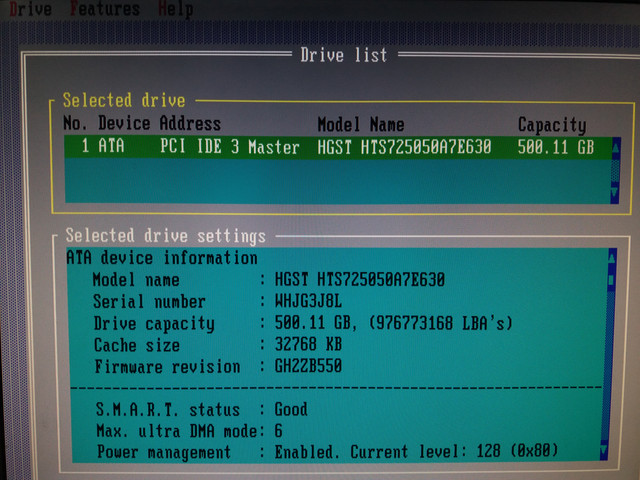
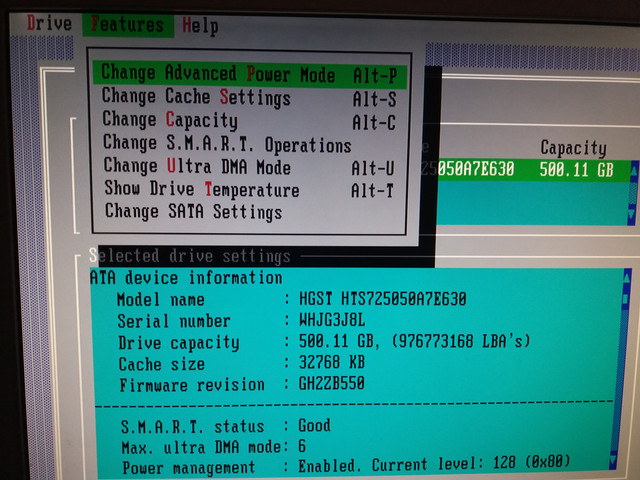

我用CrystalDiskInfo都set唔到Disable APM/Performance 會彈番轉頭
HDTune Pro都唔得
Linux就set到做254應該唔成問題
咁我仲有咩方法可以係windows入面防止佢不停咁做head parking?

作者: buster290 時間: 2020-12-23 20:41
同問, 咁會唔會好傷隻HARDDISK?
作者: 1597532468000 時間: 2020-12-23 21:28
本帖最後由 1597532468000 於 2020-12-23 22:44 編輯
搵到呢個可能幫到手
https://sites.google.com/site/disablehddapm/
set個scheduled task比佢(有admin privileges)每次開機都行一次 我諗應該work C1個數有待觀察
最後都係自問自答


問題係raid碟好似唔得 有冇人知點搞?
作者: harryytm 時間: 2020-12-24 04:40
CrystalDiskInfo 可以開機啟動嘅時候自動 Apply APM
Function > Advanced Feature > Auto AAM/APM Adoption
作者: zoin0000 時間: 2020-12-24 11:02
最近留意到隻HGST 500GB C1個數已經玩到20幾萬
我整左隻DOS USB Boot Disk 開左個Feature Tool v2.15出黎 ...
1597532468000 發表於 2020-12-23 18:46

crydiskinfo你行幾進制
作者: 1597532468000 時間: 2020-12-24 11:48
本帖最後由 1597532468000 於 2020-12-24 11:58 編輯
CrystalDiskInfo 可以開機啟動嘅時候自動 Apply APM
Function > Advanced Feature > Auto AAM/APM Adoption ...
harryytm 發表於 2020-12-24 04:40
呢個我知 但係每次set完都自動彈番去128 而且raid drive冇得set
[attach]2239094[/attach]
crydiskinfo你行幾進制
zoin0000 發表於 2020-12-24 11:02
decimal
作者: 1597532468000 時間: 2020-12-24 12:04
本帖最後由 1597532468000 於 2020-12-24 12:30 編輯
del
作者: harryytm 時間: 2020-12-24 14:44
本帖最後由 harryytm 於 2020-12-24 14:48 編輯
呢個我知 但係每次set完都自動彈番去128 而且raid drive冇得set
decimal ...
1597532468000 發表於 2020-12-24 11:48
再唔係就每次開機行一次
smartctl -s apm,off pd1
作者: KinChungE 時間: 2020-12-24 14:48
呢個我知 但係每次set完都自動彈番去128 而且raid drive冇得set
decimal ...
1597532468000 發表於 2020-12-24 11:48
一般軟件唔支援raid drive
你可以試下hdd sentinel, 支援set raid drive + 支援每次開機後自動set
作者: 1597532468000 時間: 2020-12-24 14:50
再唔係就每次開機行一次
smartctl -s apm,0 pd1
harryytm 發表於 2020-12-24 14:44
其實我入得linux就直接開win7 guest用 唔會reboot
如果有得用boot manager一開機自動熄apm再揀入win7定linux就好了

作者: 1597532468000 時間: 2020-12-24 14:51
一般軟件唔支援raid drive
你可以試下hdd sentinel, 支援set raid drive + 支援每次開機後自動set ...
KinChungE 發表於 2020-12-24 14:48
多謝 我去望下先
作者: 1597532468000 時間: 2020-12-24 16:12
回覆 9# KinChungE
係有既

[attach]2239150[/attach]
作者: KinChungE 時間: 2020-12-24 16:14
回覆 KinChungE
係有既
1597532468000 發表於 2020-12-24 16:12
恭喜哂
作者: harryytm 時間: 2020-12-24 19:06
本帖最後由 harryytm 於 2020-12-24 19:27 編輯
其實我入得linux就直接開win7 guest用 唔會reboot
如果有得用boot manager一開機自動熄apm再揀入win7定l ...
1597532468000 發表於 2020-12-24 14:50
smartctl 一向有 Windows 版
無叫你入 Linux 然後 reboot
可以去下面條 Link 下載 smartmontools Windows 版
[url=https://www.smartmontools.org/wiki/Download#InstalltheWindowspackage[]https://www.smartmontools.org/wiki/Download#InstalltheWindowspackage[/url]
你如果係 Intel RAID 可以行下面呢句停用 APM
smartctl -s apm,off csmi1,1
整成 .cmd 檔一開 Windows 就行又得
其實用熟 smartctl 呢個 command 之後
可以行 Extended Self-Test
又可以睇 S.M.A.R.T. 屬性
又可以 set APM
又可以 set 自動 Standby
基本上無需要再用其他 S.M.A.R.T. 工具
- C:\Windows\System32>smartctl -Aig all -f brief -q noserial pd3
- smartctl 7.1 2019-12-30 r5022 [x86_64-w64-mingw32-w10-b19042] (sf-7.1-1)
- Copyright (C) 2002-19, Bruce Allen, Christian Franke, www.smartmontools.org
- === START OF INFORMATION SECTION ===
- Model Family: Seagate BarraCuda 3.5
- Device Model: ST2000DM008-2FR102
- Firmware Version: 0001
- User Capacity: 2,000,398,934,016 bytes [2.00 TB]
- Sector Sizes: 512 bytes logical, 4096 bytes physical
- Rotation Rate: 7200 rpm
- Form Factor: 3.5 inches
- Device is: In smartctl database [for details use: -P show]
- ATA Version is: ACS-3 T13/2161-D revision 5
- SATA Version is: SATA 3.1, 6.0 Gb/s (current: 6.0 Gb/s)
- Local Time is: Thu Dec 24 19:27:10 2020 CST
- SMART support is: Available - device has SMART capability.
- SMART support is: Enabled
- AAM feature is: Unavailable
- APM level is: 128 (minimum power consumption without standby)
- Rd look-ahead is: Enabled
- Write cache is: Enabled
- DSN feature is: Unavailable
- ATA Security is: Disabled, NOT FROZEN [SEC1]
- === START OF READ SMART DATA SECTION ===
- SMART Attributes Data Structure revision number: 10
- Vendor Specific SMART Attributes with Thresholds:
- ID# ATTRIBUTE_NAME FLAGS VALUE WORST THRESH FAIL RAW_VALUE
- 1 Raw_Read_Error_Rate POSR-- 078 064 006 - 62704187
- 3 Spin_Up_Time PO---- 099 098 000 - 0
- 4 Start_Stop_Count -O--CK 099 099 020 - 1171
- 5 Reallocated_Sector_Ct PO--CK 100 100 010 - 0
- 7 Seek_Error_Rate POSR-- 070 060 045 - 9039852
- 9 Power_On_Hours -O--CK 095 095 000 - 4795 (184 63 0)
- 10 Spin_Retry_Count PO--C- 100 100 097 - 0
- 12 Power_Cycle_Count -O--CK 100 100 020 - 117
- 183 Runtime_Bad_Block -O--CK 100 100 000 - 0
- 184 End-to-End_Error -O--CK 100 100 099 - 0
- 187 Reported_Uncorrect -O--CK 100 100 000 - 0
- 188 Command_Timeout -O--CK 100 097 000 - 1 1 10
- 189 High_Fly_Writes -O-RCK 100 100 000 - 0
- 190 Airflow_Temperature_Cel -O---K 061 051 040 - 39 (Min/Max 33/44)
- 191 G-Sense_Error_Rate -O--CK 100 100 000 - 0
- 192 Power-Off_Retract_Count -O--CK 100 100 000 - 37
- 193 Load_Cycle_Count -O--CK 099 099 000 - 3300
- 194 Temperature_Celsius -O---K 039 049 000 - 39 (0 23 0 0 0)
- 195 Hardware_ECC_Recovered -O-RC- 078 064 000 - 62704187
- 197 Current_Pending_Sector -O--C- 100 100 000 - 0
- 198 Offline_Uncorrectable ----C- 100 100 000 - 0
- 199 UDMA_CRC_Error_Count -OSRCK 200 200 000 - 1
- 240 Head_Flying_Hours ------ 100 253 000 - 300h+39m+43.344s
- 241 Total_LBAs_Written ------ 100 253 000 - 3819747010
- 242 Total_LBAs_Read ------ 100 253 000 - 24121912041
- ||||||_ K auto-keep
- |||||__ C event count
- ||||___ R error rate
- |||____ S speed/performance
- ||_____ O updated online
- |______ P prefailure warning
作者: 1597532468000 時間: 2020-12-24 20:57
smartctl 一向有 Windows 版
無叫你入 Linux 然後 reboot
可以去下面條 Link 下載 smartmontools Windows ...
harryytm 發表於 2020-12-24 19:06
多謝c-hing
我又望下先