
作者: travelntravel 時間: 2017-1-9 11:45 標題: VBA with + if 問題
本帖最後由 travelntravel 於 2017-1-9 17:04 編輯
大家好, VBA超新手一問, 請問以下只能做到第7張的update, 做完唔識去下一張, 咁係打少左D乜野? 謝謝
Sub border()
Dim ws As Worksheet, x As Integer, i As Integer
x = 7
For i = x To Worksheets.Count
Set ws = Worksheets(i)
With ws
If Right(ActiveSheet.Name, 4) = "_PDT" Then
....
ElseIf Right(ActiveSheet.Name, 4) = "_L&D" Then
....
End If
End With
Next i
End Sub
作者: 狂蜂一號 時間: 2017-1-9 13:58
回覆 1# travelntravel
ActiveSheet >>> ws
作者: travelntravel 時間: 2017-1-9 14:24
本帖最後由 travelntravel 於 2017-1-9 14:57 編輯
唔得,咁佢會將2種結果做晒落第7頁度,其他頁做唔到。
作者: 狂蜂一號 時間: 2017-1-9 22:28
本帖最後由 狂蜂一號 於 2017-1-9 22:30 編輯
唔得,咁佢會將2種結果做晒落第7頁度,其他頁做唔到。
travelntravel 發表於 2017-1-9 14:24

To add ThisWorkbook. or Workbooks("Book1.xlsx"). before Worksheets may be a good idea.
(Which one is ActiveSheet? Will it be changed? More details?)
作者: JL* 時間: 2017-1-10 08:58
If Right(.Name, 4) = "_PDT" Then
....
ElseIf Right(.Name, 4) = "_L&D" Then
....
作者: travelntravel 時間: 2017-1-10 09:21
To add ThisWorkbook. or Workbooks("Book1.xlsx"). before Worksheets may be a good idea.
(Which one ...
狂蜂一號 發表於 2017-1-9 22:28
all code are in same excel, 即是由第7張sheet 開始,如pdt 尾的做一樣野,L&D 尾做另一樣野 check 番當時的sheet name 來決定做乜
作者: travelntravel 時間: 2017-1-10 09:26
If Right(.Name, 4) = "_PDT" Then
....
ElseIf Right(.Name, 4) = "_L&D" Then
....
JL* 發表於 2017-1-10 08:58
runtime error 1004
作者: JL* 時間: 2017-1-10 10:04
runtime error 1004
travelntravel 發表於 2017-1-10 09:26
有冇 debug 過邊句 runtime error?
作者: travelntravel 時間: 2017-1-10 11:12
有冇 debug 過邊句 runtime error?
JL* 發表於 2017-1-10 10:04
再run過又無問題,但只識做現時個頁, 唔識做之後的頁數
作者: JL* 時間: 2017-1-10 11:30
再run過又無問題,但只識做現時個頁, 唔識做之後的頁數
travelntravel 發表於 2017-1-10 11:12
"但只識做現時個頁" << 咁應該係 if 裡面其他 statements 問題
作者: travelntravel 時間: 2017-1-10 17:16
回覆 10# JL*
似係唔識跳去下一頁(with or for 有問題多)
作者: JL* 時間: 2017-1-10 18:14
回覆 11# travelntravel
- With ws
- If Right(.Name, 4) = "_PDT" Then
- ....
- ElseIf Right(.Name, 4) = "_L&D" Then
- ....
- End If
- End With
- If Right(ws.Name, 4) = "_PDT" Then
- ....
- ElseIf Right(ws.Name, 4) = "_L&D" Then
- ....
- End If
2. 如果你現在第七張 sheet 係 active,你又無 activate 其他 sheets,ActiveSheet 就係指第七張 sheet
作者: travelntravel 時間: 2017-1-12 14:24
回覆 travelntravel 等於1. With/For 唔會幫你自動去 activate 其他 sheets
2. 如果你現在第七張 sheet 係 ...
JL* 發表於 2017-1-10 18:14
Dim ws As Worksheet, x As Integer, i As Integer
x = 7
For i = x To Worksheets.Count
Set ws = Worksheets(i)
呢個唔係叫佢由第7至n 張都咁做嗎?
請問點先可以做到上述效果? thx
作者: mfai 時間: 2017-1-12 15:31
本帖最後由 mfai 於 2017-1-12 15:39 編輯
其實睇你想做d乜
唔係active worksheet 都改到内容
For i = 1 To Worksheets.Count
Worksheets(i).Name = Worksheets(i).Name & "AA"
Next i
無activate 都改到 worksheet 名
作者: 狂蜂一號 時間: 2017-1-12 16:11
回覆 13# travelntravel
"呢個唔係叫佢由第7至n 張都咁做嗎?" - No!
All codes please.
作者: travelntravel 時間: 2017-1-12 17:24
回覆 travelntravel
"呢個唔係叫佢由第7至n 張都咁做嗎?" - No!
All codes please. ...
狂蜂一號 發表於 2017-1-12 16:11
oh no, 原來係咁。
All code already. 除左個d " ..."(pdt 同l&d 唔同尾的處理方法)
作者: 狂蜂一號 時間: 2017-1-12 19:09
本帖最後由 狂蜂一號 於 2017-1-12 22:50 編輯
回覆 16# travelntravel
如果 "... " 無郁咗 worksheet 或 counter (留意 JL* 師兄嘅回覆),只看 #1 帖的 code, Excel (Worksheets.Count - 7 + 1) 次,不過全部做晒落 ActiveSheet 度。
假如 ActiveSheet 符合 "_PDT",咁唔理做幾多次,都只會入去嗰度。如果郁咗 worksheet 或 counter 咁就難講嘞!所以要睇晒全部 code.
作者: travelntravel 時間: 2017-1-13 09:57
回覆 travelntravel
如果 "... " 無郁咗 worksheet 或 counter (留意 JL* 師兄嘅回覆),只看 #1 帖的 co ...
狂蜂一號 發表於 2017-1-12 19:09
... 無郁過sheet, 只係改pdt or l&d sheet入面的框同顏色。
咁如果想做到由sheet 7 to n 都check sheet name, then 因應pdt or l&d 而做唔同野,應該點寫?
點先識做完第7張,then active shhet 變第8, and then active sheet 變第9 咁每張check ? thx a lot
作者: 狂蜂一號 時間: 2017-1-13 21:26
回覆 18# travelntravel
Sub border()
Dim ws As Worksheet, x As Integer, i As Integer
ThisWorkbook.Activate 'make sure Worksheets.Count and Worksheets(i) refer to ThisWorkbook
x = 7
For i = x To Worksheets.Count
Set ws = Worksheets(i)
With ws
If Right(.Name, 4) = "_PDT" Then 'PDT <> pdt
....
ElseIf Right(.Name, 4) = "_L&D" Then
....
Else '?
End If
End With
Next i
End Sub
Sub PS()
'If Not OK Then
'We need all codes and the structure of your workbook
'Else
'...
'End If
End Sub
作者: travelntravel 時間: 2017-1-16 10:46
都係只識做current sheet
Sub border()
Dim ws As Worksheet, x As Integer, i As Integer
ThisWorkbook.Activate
x = 7
For i = x To Worksheets.Count
Set ws = Worksheets(i)
With ws
If Right(ActiveSheet.Name, 4) = "_PDT" Then
Range("BA25:BA44,BA46:BA65,BA67:BA86,BA88:BA107,BA109:BA128,BA230:BA249,BA251:BA270,BA272:BA291,BA293:BA312,BA314:BA333,BA335:BA354,BA456:BA475,BA477:BA496,BA498:BA517,BA519:BA538,BA540:BA559").Select
Range("BA540").Activate
Selection.Borders(xlDiagonalDown).LineStyle = xlNone
Selection.Borders(xlDiagonalUp).LineStyle = xlNone
With Selection.Borders(xlEdgeLeft)
.LineStyle = xlContinuous
.ColorIndex = 0
.TintAndShade = 0
.Weight = xlThin
End With
With Selection.Borders(xlEdgeTop)
.LineStyle = xlContinuous
.ColorIndex = 0
.TintAndShade = 0
.Weight = xlThin
End With
With Selection.Borders(xlEdgeBottom)
.LineStyle = xlContinuous
.ColorIndex = 0
.TintAndShade = 0
.Weight = xlThin
End With
With Selection.Borders(xlEdgeRight)
.LineStyle = xlContinuous
.ColorIndex = 0
.TintAndShade = 0
.Weight = xlThin
End With
Selection.Borders(xlInsideVertical).LineStyle = xlNone
Selection.Borders(xlInsideHorizontal).LineStyle = xlNone
ElseIf Right(ActiveSheet.Name, 4) = "_L&D" Then
Range("BA24:BA43,BA45:BA64,BA66:BA85,BA87:BA106,BA108:BA127,BA129:BA148,BF24:BF43,BF45:BF64,BF66:BF85,BF87:BF106,BF108:BF127,BF129:BF148").Select
Range("BA24").Activate
Selection.Borders(xlDiagonalDown).LineStyle = xlNone
Selection.Borders(xlDiagonalUp).LineStyle = xlNone
With Selection.Borders(xlEdgeLeft)
.LineStyle = xlContinuous
.ColorIndex = 0
.TintAndShade = 0
.Weight = xlThin
End With
With Selection.Borders(xlEdgeTop)
.LineStyle = xlContinuous
.ColorIndex = 0
.TintAndShade = 0
.Weight = xlThin
End With
With Selection.Borders(xlEdgeBottom)
.LineStyle = xlContinuous
.ColorIndex = 0
.TintAndShade = 0
.Weight = xlThin
End With
With Selection.Borders(xlEdgeRight)
.LineStyle = xlContinuous
.ColorIndex = 0
.TintAndShade = 0
.Weight = xlThin
End With
Selection.Borders(xlInsideVertical).LineStyle = xlNone
Selection.Borders(xlInsideHorizontal).LineStyle = xlNone
End If
End With
Next
End Sub
作者: 狂蜂一號 時間: 2017-1-16 14:35
回覆 20# travelntravel
Sub border()
' Dim ws As Worksheet
Dim x As Integer, i As Integer
ThisWorkbook.Activate
x = 7
For i = x To Worksheets.Count
' Set ws = Worksheets(i)
' With ws
Worksheets(i).Activate
If Right(ActiveSheet.Name, 4) = "_PDT" Then
Range("BA25:BA44,BA46:BA65,BA67:BA86,BA88:BA107,BA109:BA128,BA230:BA249,BA251:BA270,BA272:BA291,BA293:BA312,BA314:BA333,BA335:BA354,BA456:BA475,BA477:BA496,BA498:BA517,BA519:BA538,BA540:BA559").Select
' Range("BA540").Activate
Selection.Borders(xlDiagonalDown).LineStyle = xlNone
Selection.Borders(xlDiagonalUp).LineStyle = xlNone
With Selection.Borders(xlEdgeLeft)
.LineStyle = xlContinuous
.ColorIndex = 0
.TintAndShade = 0
.Weight = xlThin
End With
With Selection.Borders(xlEdgeTop)
.LineStyle = xlContinuous
.ColorIndex = 0
.TintAndShade = 0
.Weight = xlThin
End With
With Selection.Borders(xlEdgeBottom)
.LineStyle = xlContinuous
.ColorIndex = 0
.TintAndShade = 0
.Weight = xlThin
End With
With Selection.Borders(xlEdgeRight)
.LineStyle = xlContinuous
.ColorIndex = 0
.TintAndShade = 0
.Weight = xlThin
End With
Selection.Borders(xlInsideVertical).LineStyle = xlNone
Selection.Borders(xlInsideHorizontal).LineStyle = xlNone
ElseIf Right(ActiveSheet.Name, 4) = "_L&D" Then
Range("BA24:BA43,BA45:BA64,BA66:BA85,BA87:BA106,BA108:BA127,BA129:BA148,BF24:BF43,BF45:BF64,BF66:BF85,BF87:BF106,BF108:BF127,BF129:BF148").Select
' Range("BA24").Activate
Selection.Borders(xlDiagonalDown).LineStyle = xlNone
Selection.Borders(xlDiagonalUp).LineStyle = xlNone
With Selection.Borders(xlEdgeLeft)
.LineStyle = xlContinuous
.ColorIndex = 0
.TintAndShade = 0
.Weight = xlThin
End With
With Selection.Borders(xlEdgeTop)
.LineStyle = xlContinuous
.ColorIndex = 0
.TintAndShade = 0
.Weight = xlThin
End With
With Selection.Borders(xlEdgeBottom)
.LineStyle = xlContinuous
.ColorIndex = 0
.TintAndShade = 0
.Weight = xlThin
End With
With Selection.Borders(xlEdgeRight)
.LineStyle = xlContinuous
.ColorIndex = 0
.TintAndShade = 0
.Weight = xlThin
End With
Selection.Borders(xlInsideVertical).LineStyle = xlNone
Selection.Borders(xlInsideHorizontal).LineStyle = xlNone
End If
' End With
Next i
End Sub
作者: travelntravel 時間: 2017-1-23 16:23
本帖最後由 travelntravel 於 2017-1-23 16:30 編輯
回覆 21# 狂蜂一號
仍出run time error 1004, 其實唔activate current sheet 都可以, 只要佢識由第7張開始, 因應唔同sheet name 做唔同野就可以了. 請問咁會簡單D嗎? 非常感謝各位解答
作者: 狂蜂一號 時間: 2017-1-24 01:09
本帖最後由 狂蜂一號 於 2017-1-24 01:11 編輯
回覆 狂蜂一號
仍出run time error 1004, 其實唔activate current sheet 都可以, 只要佢識由第7張開 ...
travelntravel 發表於 2017-1-23 16:23
如果你所指嘅 ActiveSheet, 第 7 至 第 Worksheets.Count 張 worksheet 和 code 都在同一個 workbook,係無可能會出 error 1004 嘅。
以上嘅 code 係行晒 7 至 Worksheets.Count 張 worksheet,符合條件嘅就將啲 border 嘢做落嗰啲 worksheet 度。
不過,照你咁講,可能我誤會咗你嘅要求啦!
如果你所指嘅 ActiveSheet 唔包括第 7 至 第 Worksheets.Count 張;或者,"_PDT" 和 "_L&D" 唔係指第 7 至 第 Worksheets.Count 張 worksheet。咁上面嘅 code 就完全唔係嗰回事囉!
作者: 狂蜂一號 時間: 2017-1-24 01:27
本帖最後由 狂蜂一號 於 2017-1-24 03:50 編輯
回覆 22# travelntravel
錄製嘅 macro, ActiveSheet 嘅嘢唔會加".",佢會用 Range, 唔會用 .Range。如果錄製嘅時候,你揀另一張 sheet, 佢一樣會 Activate 嗰張 sheet, 咁呢個 Range 就唔同嗰個 Range 嘞。
所以我一開始(#4 帖)就想你搞清楚邊張 sheet 打邊張 sheet。(原來我都未清楚 -- 之前仲以為清楚添)

作者: travelntravel 時間: 2017-1-25 16:41
本帖最後由 travelntravel 於 2017-1-25 16:43 編輯
如果你所指嘅 ActiveSheet, 第 7 至 第 Worksheets.Count 張 worksheet 和 code 都在同一個 workbook,係 ...
狂蜂一號 發表於 2017-1-24 01:09
無錯, 係好似你咁講, 行晒 7 至 Worksheets.Count 張 worksheet,符合條件嘅就將啲 border 嘢做落嗰啲 worksheet 度.
因為有師兄響#14話"唔係active worksheet 都改到内容", 所以先咁問啫. 純粹想試下有無其他方法做到.
其實如果我唔用for loop, 逐張逐張咁做(唔用for loop只抄番中間D code), 做完第一張再做第二張時, 佢都會出1004. 上網睇過話可能D code 太多, 所以run唔到第二張. 如果我做完第一張, close excel, 再做第二張, 咁係無問題的, 但會好煩.
我用番師兄比既code, run 唔到, 會否都係D code 太多太複雜的問題? 唔好意思, 因為真係好新手, 我本身只識SQL 無用開VBA. 完全唔識, 完全係自己摸, 又無人問. THX
作者: 狂蜂一號 時間: 2017-1-25 19:51
回覆 25# travelntravel
D code 一啲都唔多,一啲都唔複雜,而且電腦唔會怕麻煩;人先會怕麻煩,所以我哋先會學 VBA, 對吧?
慢慢來,不要灰心!
"因為有師兄響#14話"唔係active worksheet 都改到内容""
無錯!我都避免用 ActiveSheet,除非在那張 sheet 上面 run (例如整粒 button 喺度)。不過,之前跟你嘅 code 可以改動最少。
作者: 狂蜂一號 時間: 2017-1-25 20:13
無錯, 係好似你咁講, 行晒 7 至 Worksheets.Count 張 worksheet,符合條件嘅就將啲 border 嘢做落嗰啲 w ...
travelntravel 發表於 2017-1-25 16:41
點解我會無問題呢?
等我再諗諗。


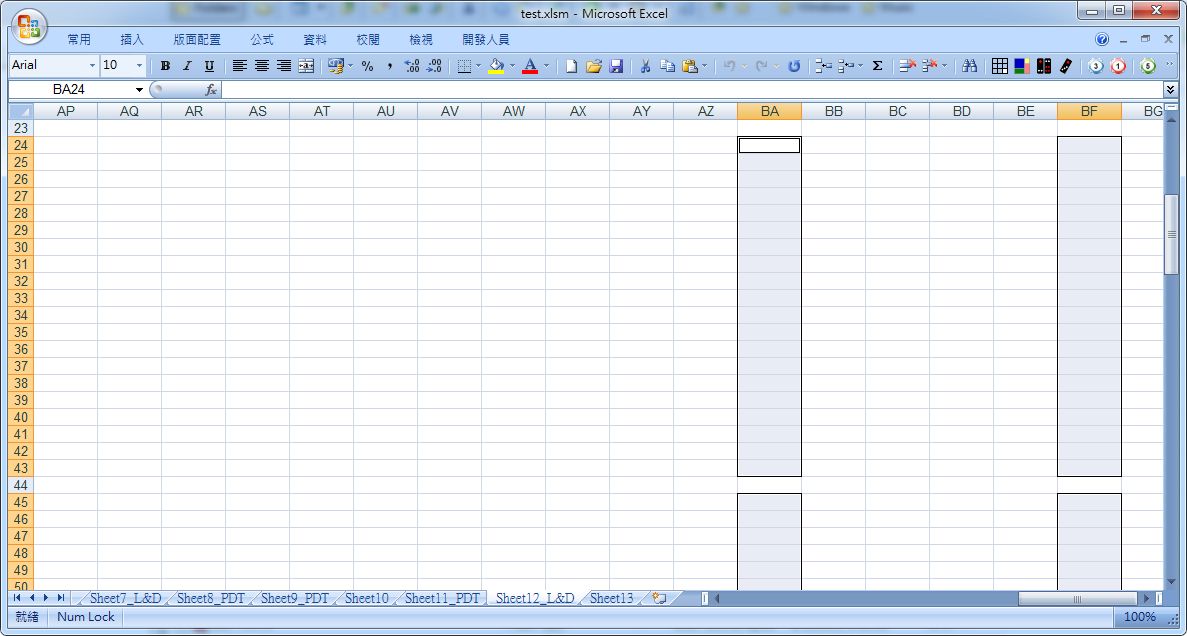
Excel 2007 ?; the structure of workbook OK ?
 圖片附件: test.jpg (2017-1-25 20:13, 124.96 KB) / 下載次數 87
https://h2.hkepc.com/forum/attachment.php?aid=1956025&k=cb1f4bb7421e10ad08d919fc33efcc55&t=1781591582&sid=1NGHx7vLtO
作者: 狂蜂一號 時間: 2017-1-26 21:46
Try this: no ActiveSheet, no need .Activate; not using Select method.
Option Explicit
DefInt A-Z
Sub border()
Dim x As Integer, i As Integer
x = 7
For i = x To ThisWorkbook.Worksheets.Count
With ThisWorkbook.Worksheets(i)
If Right(.Name, 4) = "_PDT" Then
With .Range("BA25:BA44,BA46:BA65,BA67:BA86,BA88:BA107,BA109:BA128,BA230:BA249,BA251:BA270,BA272:BA291,BA293:BA312,BA314:BA333,BA335:BA354,BA456:BA475,BA477:BA496,BA498:BA517,BA519:BA538,BA540:BA559")
.Borders(xlDiagonalDown).LineStyle = xlNone
.Borders(xlDiagonalUp).LineStyle = xlNone
With .Borders(xlEdgeLeft)
.LineStyle = xlContinuous
.ColorIndex = 0
.TintAndShade = 0
.Weight = xlThin
End With
With .Borders(xlEdgeTop)
.LineStyle = xlContinuous
.ColorIndex = 0
.TintAndShade = 0
.Weight = xlThin
End With
With .Borders(xlEdgeBottom)
.LineStyle = xlContinuous
.ColorIndex = 0
.TintAndShade = 0
.Weight = xlThin
End With
With .Borders(xlEdgeRight)
.LineStyle = xlContinuous
.ColorIndex = 0
.TintAndShade = 0
.Weight = xlThin
End With
.Borders(xlInsideVertical).LineStyle = xlNone
.Borders(xlInsideHorizontal).LineStyle = xlNone
End With
ElseIf Right(.Name, 4) = "_L&D" Then
With .Range("BA24:BA43,BA45:BA64,BA66:BA85,BA87:BA106,BA108:BA127,BA129:BA148,BF24:BF43,BF45:BF64,BF66:BF85,BF87:BF106,BF108:BF127,BF129:BF148")
.Borders(xlDiagonalDown).LineStyle = xlNone
.Borders(xlDiagonalUp).LineStyle = xlNone
With .Borders(xlEdgeLeft)
.LineStyle = xlContinuous
.ColorIndex = 0
.TintAndShade = 0
.Weight = xlThin
End With
With .Borders(xlEdgeTop)
.LineStyle = xlContinuous
.ColorIndex = 0
.TintAndShade = 0
.Weight = xlThin
End With
With .Borders(xlEdgeBottom)
.LineStyle = xlContinuous
.ColorIndex = 0
.TintAndShade = 0
.Weight = xlThin
End With
With .Borders(xlEdgeRight)
.LineStyle = xlContinuous
.ColorIndex = 0
.TintAndShade = 0
.Weight = xlThin
End With
.Borders(xlInsideVertical).LineStyle = xlNone
.Borders(xlInsideHorizontal).LineStyle = xlNone
End With
Else
'do nothing
End If
End With
Next i
End Sub
作者: travelntravel 時間: 2017-1-30 09:41
本帖最後由 travelntravel 於 2017-1-30 09:43 編輯
我知點解了, 好辛苦終搵到識VBA的朋友問. #23 貼的CODE已經可以, 因為我貼CODE去MACRO時無選番THIS WORKBOOK, DEFAULT係就咁響張CURRENT SHEET度, 所以唔得. 非常多謝各位, 特別係狂蜂一號師兄耐心解答.