
作者: MSI_R9_280_Gami 時間: 2026-1-23 00:01 標題: super pi & sysbench
本帖最後由 MSI_R9_280_Gami 於 2026-1-23 00:54 編輯
super_pi同pi run唔到,似乎因為 ./Makefile入面(found @ a github page)
CC = gcc
#Set this to the cpu to target
-march=i686改做x86-64或amd64,或3代ivybridge 5代broadwell
russo-altlinux apt-get install gcc,make all都唔得,compiled failed。唔識Using the musl-gcc wrapper to compile musl packages所以放棄。void musl唔同alpinelinux唔係用純正musl,底層都係調用glibc2
super_pi係2007年左右既windows software,俾人port左做linux version,不過編譯架構太舊,binary ball要重新compile過 from source code。super_pi係計算圓周率測試CPU單綫程性能,多核並行用sysbench
作者: MSI_R9_280_Gami 時間: 2026-1-23 00:01
本帖最後由 MSI_R9_280_Gami 於 2026-1-23 17:26 編輯
p1 p2 installation of sysbench on void musl & debian
p3 sysbench cpu 計質數(素數)結果 on debian 3代ivybridge X79
p4 sysbench cpu 計質數結果 on void musl 3代ivybridge X79
p5 sysbench cpu 計質數結果 on void musl 5代broadwell Z97,似乎因為高頻率,加上128MB vram for iGP was set as L4 cache,E3-1285L v4 4C8T 比E5-2697 v2 12C24T快左一倍。musl package亦run得比glibc2 libc6快
#sysbench cpu --cpu-max-prime=? --threads=? --events=1 run
--events=?,run幾多次質數篩查。另一個替代,交替性選項係--time=?,規定時間內run到幾多次
--cpu-max-prime=?質數範圍,我選左5000000或50000000。--threads=?,4C8T定12C24T,綫程數 threads-counts
两台服务器进行CPU性能比较,当素数上限和线程数一致时:
相同时间,比较events;
相同events,比较时间;
时间和events都相同,比较标准差。
https://imgur.com/a/2TeKPJ2


https://zhuanlan.zhihu.com/p/691766392
使用SuperPi和Sysbench测试CPU性能 - 知乎
https://zhuanlan.zhihu.com/p/689586190
分布式存储性能调优 - sysbench内存带宽测试详解 - 知乎
https://www.zhihu.com/question/604623646/answer/3064216963
如何评估计算机的算力性能? - 知乎
https://blog.csdn.net/weixin_43494937/article/details/106997308
Super PI linux 版本最新可用_super pi arm-CSDN博客
sysbench除左run cpu test仲可以test numa bandwidth(而不是SMP),zhihu大陸仔部機係server板雙路3647,6通道 x2:
6-channels DDR4 6-sticks=CPU1=CPU2=6-channels DDR4 6-sticks
6=1=QPI / UPI=1=6
所以佢提到「本地内存带宽测试」同「远程内存带宽测试」、「混合内存带宽测试」。XEONs之間通過北橋QPI / UPI互聯。(DMI係南橋同北橋互聯),即係一個CPU訪問另一個CPU的DDR4 recc
作者: MSI_R9_280_Gami 時間: 2026-1-23 00:32
as a result
- void@void ~> sysbench cpu --cpu-max-prime=5000000 --threads=8 --events=1 run
- sysbench 1.0.20 (using system LuaJIT 2.1.0-beta3)
- Running the test with following options:
- Number of threads: 8
- Initializing random number generator from current time
- Prime numbers limit: 5000000
- Initializing worker threads...
- Threads started!
- CPU speed:
- events per second: 0.22
- General statistics:
- total time: 4.4461s
- total number of events: 1
- Latency (ms):
- min: 4446.04
- avg: 4446.04
- max: 4446.04
- 95th percentile: 4437.27
- sum: 4446.04
- Threads fairness:
- events (avg/stddev): 0.1250/0.33
- execution time (avg/stddev): 0.5558/1.47
作者: MSI_R9_280_Gami 時間: 2026-1-23 14:59
本帖最後由 MSI_R9_280_Gami 於 2026-1-24 02:31 編輯
sysbench memory子命令用于测试内存性能,包括时延和带宽数据,本文只关注带宽数据。sysbench memory有6个可以配置的参数:
--memory-block-size=SIZE, 指定分配的buffer大小,不要分配得太小,否则会出现数据全从CPU缓存命中,达不到测试内存带宽的目的。本文测试用例中每个sysbench进程都设置为1GB。
--memory-total-size=SIZE,指定总共要测试多少数据量,例如100GB,那么便会循环操作--memory-block-size(例如1G)100次。每次操作以8字节对1GB buffer进行读写,直到1GB读写完毕。
--memory-scope=STRING,指定访问本地内存还是全局内存。本文的测试中使用numactl控制了内存访问范围,所以这个参数可以直接忽略。
--memory-hugetlb[=on|off],是否从分配大页内存。本文的测试中设置为on。
--memory-oper=STRING,指定read/wirte操作,默认是write。
--memory-access-mode=STRING,指定seq/rnd,即顺序或随机,默认是seq。
void@void ~> sysbench memory help
sysbench 1.0.20 (using system LuaJIT 2.1.0-beta3)
memory options:
--memory-block-size=SIZE size of memory block for test [1K]
--memory-total-size=SIZE total size of data to transfer [100G]
--memory-scope=STRING memory access scope {global,local} [global]
--memory-hugetlb[=on|off] allocate memory from HugeTLB pool [off]
--memory-oper=STRING type of memory operations {read, write, none} [write]
--memory-access-mode=STRING memory access mode {seq,rnd} [seq]
void @void ~ > sysbench memory --memory-block-size=5GB --memory-total-size=200GB run
sysbench 1.0.20 (using system LuaJIT 2.1.0-beta3)
FATAL: Invalid value for memory-block-size: 5GB
void@void ~ [1]> sysbench memory --memory-block-size=1GB --memory-total-size=200GB run
sysbench 1.0.20 (using system LuaJIT 2.1.0-beta3)
Running the test with following options:
Number of threads: 1
Initializing random number generator from current time
Running memory speed test with the following options:
block size: 1048576KiB
total size: 204800MiB
operation: write
scope: global
Initializing worker threads...
Threads started!
Total operations: 103 ( 10.20 per second)
105472.00 MiB transferred (10445.16 MiB/sec)
General statistics:
total time: 10.0961s
total number of events: 103
Latency (ms):
min: 96.24
avg: 98.01
max: 101.50
95th percentile: 99.33
sum: 10095.44
Threads fairness:
events (avg/stddev): 103.0000/0.00
execution time (avg/stddev): 10.0954/0.00
void@void ~> sysbench memory --memory-block-size=2GB --memory-total-size=200GB run
sysbench 1.0.20 (using system LuaJIT 2.1.0-beta3)
Running the test with following options:
Number of threads: 1
Initializing random number generator from current time
Running memory speed test with the following options:
block size: 2097152KiB
total size: 204800MiB
operation: write
scope: global
Initializing worker threads...
Threads started!
Total operations: 51 ( 5.04 per second)
104448.00 MiB transferred (10314.30 MiB/sec)
General statistics:
total time: 10.1249s
total number of events: 51
Latency (ms):
min: 193.10
avg: 198.52
max: 204.63
95th percentile: 204.11
sum: 10124.50
Threads fairness:
events (avg/stddev): 51.0000/0.00
execution time (avg/stddev): 10.1245/0.00
void@void ~> sysbench memory --memory-block-size=3GB --memory-total-size=200GB run
sysbench 1.0.20 (using system LuaJIT 2.1.0-beta3)
FATAL: Invalid value for memory-block-size: 3GB
以上乃E3-1285L v4 + GA-Z97-HD3 REV:2.0 + DDR3-2000mt/s 8GB x4 2通道4條 CL11-11-11-28
以下乃E5-2697 v2 + ASUS Sabertooth X79 + DDR3-1866mt/s 8GB x8 4通道8條 CL10-10-10-27
由于Xeon E5 TDP限制,無法超頻CPU & memory,所以我的ram步战士2200mt/s CL13-13-13-33(uefi睇係CL11,memtest86+睇係CL13)只可以stay @1866mt/s CL10-10-10-27 on Sabertooth X79 & Xeon E5-2697 v2,好奇怪,X79 4-ch得8.5GB/s,反而Z97 2-ch有10.3GB/s
debian@debian:~/Videos/SuperPI-main$ sysbench memory --memory-block-size=2GB --memory-total-size=200GB run
sysbench 1.0.20 (using system LuaJIT 2.1.1700206165)
Running the test with following options:
Number of threads: 1
Initializing random number generator from current time
Running memory speed test with the following options:
block size: 2097152KiB
total size: 204800MiB
operation: write
scope: global
Initializing worker threads...
Threads started!
Total operations: 42 ( 4.18 per second)
86016.00 MiB transferred (8550.65 MiB/sec)
General statistics:
total time: 10.0575s
total number of events: 42
Latency (ms):
min: 238.78
avg: 239.45
max: 246.02
95th percentile: 240.02
sum: 10056.70
Threads fairness:
events (avg/stddev): 42.0000/0.00
execution time (avg/stddev): 10.0567/0.00
作者: MSI_R9_280_Gami 時間: 2026-1-23 15:47
本帖最後由 MSI_R9_280_Gami 於 2026-1-26 23:25 編輯
上左鬼佬壇問鬼佬,super_pi compilation方法est on below,worked on Void Musl & debian glibc2 libc6,人生第二次compiling成功,第一次係brave
binaric ball pi means it was compiled as -march=ivybridge,pi_css5 as broadwell
https://github.com/Fibonacci43/SuperPI?tab=readme-ov-file#build-on-linux
#xbps-install gcc
$cd ./;gcc -O -funroll-loops -fomit-frame-pointer pi_fftcs.c fftsg_h.c -lm -o pi_css5;./pi_css5
void@void ~/V/SuperPI-main> gcc -O -funroll-loops -fomit-frame-pointer pi_fftcs.c fftsg_h.c -lm -o pi_css5
void@void ~/V/SuperPI-main> /home/void/Videos/SuperPI-main/pi_css5
Calculation of PI using FFT and AGM, ver. LG1.1.2-MP1.5.2a.memsave
Usage: /home/void/Videos/SuperPI-main/pi_css5 digits
Number of digits of pi to calculate?
100
initializing...
nfft= 32
radix= 10000
error_margin= 5.15588e-07
calculating 128 digits of PI...
AGM iteration
precision= 48: 0.00 sec
precision= 80: 0.00 sec
precision= 176: 0.00 sec
writing pi128.txt...
0.00 sec. (real time)
Hit RETURN to exit.
void@void ~/V/SuperPI-main [SIGINT]> /home/void/Videos/SuperPI-main/pi_css5 500000
Calculation of PI using FFT and AGM, ver. LG1.1.2-MP1.5.2a.memsave
initializing...
nfft= 131072
radix= 10000
error_margin= 0.0029395
calculating 524288 digits of PI...
AGM iteration
precision= 48: 0.03 sec
precision= 80: 0.03 sec
precision= 176: 0.03 sec
precision= 352: 0.03 sec
precision= 688: 0.03 sec
precision= 1392: 0.03 sec
precision= 2784: 0.03 sec
precision= 5584: 0.03 sec
precision= 11168: 0.03 sec
precision= 22336: 0.03 sec
precision= 44688: 0.03 sec
precision= 89408: 0.03 sec
precision= 178816: 0.03 sec
precision= 357648: 0.03 sec
precision= 715312: 0.03 sec
writing pi524288.txt...
0.60 sec. (real time)
void@void ~/M/SuperPI-main> ./pi_css5 50000000
Calculation of PI using FFT and AGM, ver. LG1.1.2-MP1.5.2a.memsave
initializing...
nfft= 16777216
radix= 10000
error_margin= 0.365078
calculating 67108864 digits of PI...
AGM iteration
precision= 48: 6.38 sec
precision= 80: 6.31 sec
precision= 176: 6.52 sec
precision= 352: 6.53 sec
precision= 688: 6.49 sec
precision= 1392: 6.52 sec
precision= 2784: 6.54 sec
precision= 5584: 6.42 sec
precision= 11168: 6.42 sec
precision= 22336: 6.47 sec
precision= 44688: 6.34 sec
precision= 89408: 6.31 sec
precision= 178816: 6.24 sec
precision= 357648: 6.25 sec
precision= 715312: 6.25 sec
precision= 1430640: 6.23 sec
precision= 2861280: 6.24 sec
precision= 5722592: 6.20 sec
precision= 11445200: 6.21 sec
precision= 22890416: 6.21 sec
precision= 45780848: 6.24 sec
precision= 91561728: 6.22 sec
writing pi67108864.txt...
156.92 sec. (real time)
#xbps-remove binutils-doc binutils-libs libdebuginfod binutils libgcc-devel libstdc++-devel libatomic libatomic-devel kernel-libc-headers musl-devel gcc unzip
debian@debian:~/Videos/SuperPI-main$ ./pi 10000
Calculation of PI using FFT and AGM, ver. LG1.1.2-MP1.5.2a.memsave
initializing...
nfft= 4096
radix= 10000
error_margin= 7.41633e-05
calculating 16384 digits of PI...
AGM iteration
precision= 48: 0.00 sec
precision= 80: 0.00 sec
precision= 176: 0.00 sec
precision= 352: 0.00 sec
precision= 688: 0.00 sec
precision= 1392: 0.00 sec
precision= 2784: 0.00 sec
precision= 5584: 0.00 sec
precision= 11168: 0.00 sec
precision= 22336: 0.00 sec
writing pi16384.txt...
0.02 sec. (real time)
debian@debian:~/Videos/SuperPI-main$ ./pi 500000
Calculation of PI using FFT and AGM, ver. LG1.1.2-MP1.5.2a.memsave
initializing...
nfft= 131072
radix= 10000
error_margin= 0.0029395
calculating 524288 digits of PI...
AGM iteration
precision= 48: 0.05 sec
precision= 80: 0.05 sec
precision= 176: 0.05 sec
precision= 352: 0.05 sec
precision= 688: 0.05 sec
precision= 1392: 0.05 sec
precision= 2784: 0.05 sec
precision= 5584: 0.05 sec
precision= 11168: 0.05 sec
precision= 22336: 0.05 sec
precision= 44688: 0.05 sec
precision= 89408: 0.05 sec
precision= 178816: 0.05 sec
precision= 357648: 0.05 sec
precision= 715312: 0.05 sec
writing pi524288.txt...
0.91 sec. (real time)
debian@debian:~/Videos/SuperPI-main$ ./pi 50000000
Calculation of PI using FFT and AGM, ver. LG1.1.2-MP1.5.2a.memsave
initializing...
nfft= 16777216
radix= 10000
error_margin= 0.365078
calculating 67108864 digits of PI...
AGM iteration
precision= 48: 10.12 sec
precision= 80: 10.07 sec
precision= 176: 10.10 sec
precision= 352: 10.12 sec
precision= 688: 10.12 sec
precision= 1392: 10.12 sec
precision= 2784: 10.13 sec
precision= 5584: 10.10 sec
precision= 11168: 10.05 sec
precision= 22336: 10.10 sec
precision= 44688: 10.11 sec
precision= 89408: 10.10 sec
precision= 178816: 10.07 sec
precision= 357648: 10.06 sec
precision= 715312: 10.08 sec
precision= 1430640: 10.11 sec
precision= 2861280: 10.11 sec
precision= 5722592: 10.10 sec
precision= 11445200: 10.15 sec
precision= 22890416: 10.08 sec
precision= 45780848: 10.08 sec
precision= 91561728: 10.10 sec
writing pi67108864.txt...
250.08 sec. (real time)
intel turbo boost對core i5 i7 Xeon E3效能提升影響好大(亦有可能係Broadwell vram for iGP as L4 cache有關),E5限定TDP,DDR bandwidth同算力都差d
Super PI是一個計算圓周率的電腦程式,最大精確到小數點以後的3200萬位數。該程式採用高斯-勒讓德演算法,並且於1995年被日本電腦科學家金田康正使用在Windows環境下計算出精確到232次方的圓周率。
高斯-勒讓德演算法是一種用於計算圓周率(π)的演算法。它以迅速收斂著稱,只需25次迭代即可產生π的4500萬位正確數字。不過,它的缺點是主記憶體密集,因此有時它不如梅欽類公式使用廣泛。
該演算法具有二階收斂性,本質上說就是演算法每執行一步正確位數就會加倍。
Cache L1: 64 KB (per core)
Cache L2: 256 KB (per core)
Cache L3: 30 MB (shared)
E5-2697 v2似乎cache輸蝕俾E3-1285L v4的128MB L4 cache,難怪之前睇過有篇文話有d使用情況下5代CPU可以打平8代9代甚至10代U,類似AMD X3D咁大cache advantage。比起E5-4650 4657L 2697 v2,E3-1285L v4高時脈,大L4 cache,新架構新指令集,run super-pi計圓周率,sysbench計質數,memory bandwidth都有優勢
debian@debian:~/Music/SuperPI-main$ gcc -O -funroll-loops -fomit-frame-pointer pi_fftcs.c fftsg_h.c -lm -o pi-libc6-3ʳᵈivybridge
debian@debian:~/Music/SuperPI-main$ ./pi-libc6-3ʳᵈivybridge 300000000
Calculation of PI using FFT and AGM, ver. LG1.1.2-MP1.5.2a.memsave
initializing...
nfft= 134217728
radix= 1000
error_margin= 0.0560284
calculating 402653184 digits of PI...
AGM iteration
precision= 36: 87.94 sec
precision= 84: 88.21 sec
precision= 168: 87.79 sec
precision= 348: 87.65 sec
precision= 696: 87.95 sec
precision= 1392: 88.12 sec
precision= 2784: 87.79 sec
precision= 5580: 87.51 sec
precision= 11160: 87.90 sec
precision= 22344: 87.93 sec
precision= 44688: 87.91 sec
precision= 89400: 88.27 sec
precision= 178812: 87.97 sec
precision= 357648: 87.70 sec
precision= 715308: 87.76 sec
precision= 1430628: 87.89 sec
precision= 2861280: 87.86 sec
precision= 5722584: 87.97 sec
precision= 11445192: 88.02 sec
precision= 22890408: 87.72 sec
precision= 45780852: 87.38 sec
precision= 91561716: 87.35 sec
precision= 183123468: 87.90 sec
precision= 366246960: 87.87 sec
precision= 732493944: 87.86 sec
writing pi402653184.txt...
2435.97 sec. (real time)
void@void ~/M/SuperPI-main> ./pi-voidMUSL-5ᵗʰbroadwell 300000000
Calculation of PI using FFT and AGM, ver. LG1.1.2-MP1.5.2a.memsave
initializing...
nfft= 134217728
radix= 1000
error_margin= 0.0561774
calculating 402653184 digits of PI...
AGM iteration
precision= 36: 59.66 sec
precision= 84: 58.57 sec
precision= 168: 59.34 sec
precision= 348: 59.91 sec
precision= 696: 58.97 sec
precision= 1392: 58.43 sec
precision= 2784: 59.67 sec
precision= 5580: 59.88 sec
precision= 11160: 59.69 sec
precision= 22344: 59.08 sec
precision= 44688: 59.83 sec
precision= 89400: 58.58 sec
precision= 178812: 58.94 sec
precision= 357648: 59.26 sec
precision= 715308: 59.20 sec
precision= 1430628: 60.34 sec
precision= 2861280: 58.43 sec
precision= 5722584: 57.23 sec
precision= 11445192: 57.27 sec
precision= 22890408: 57.52 sec
precision= 45780852: 59.47 sec
precision= 91561716: 58.69 sec
precision= 183123468: 58.90 sec
precision= 366246960: 58.73 sec
precision= 732493944: 58.93 sec
writing pi402653184.txt...
1635.52 sec. (real time)
void@void ~/M/SuperPI-main> gcc -O -funroll-loops -fomit-frame-pointer pi_fftcs.c fftsg_h.c -lm -o pi-voidMUSL-3ʳᵈivybridge
void@void ~/M/SuperPI-main> ./pi-voidMUSL-3ʳᵈivybridge 300000000
Calculation of PI using FFT and AGM, ver. LG1.1.2-MP1.5.2a.memsave
initializing...
nfft= 134217728
radix= 1000
error_margin= 0.0561774
calculating 402653184 digits of PI...
AGM iteration
precision= 36: 91.13 sec
precision= 84: 88.87 sec
precision= 168: 88.87 sec
precision= 348: 89.33 sec
precision= 696: 89.20 sec
precision= 1392: 89.02 sec
precision= 2784: 89.24 sec
precision= 5580: 89.20 sec
precision= 11160: 89.16 sec
precision= 22344: 89.04 sec
precision= 44688: 89.05 sec
precision= 89400: 89.03 sec
precision= 178812: 89.03 sec
precision= 357648: 89.02 sec
precision= 715308: 89.11 sec
precision= 1430628: 89.21 sec
precision= 2861280: 89.21 sec
precision= 5722584: 89.23 sec
precision= 11445192: 89.30 sec
precision= 22890408: 89.19 sec
precision= 45780852: 89.21 sec
precision= 91561716: 89.22 sec
precision= 183123468: 89.20 sec
precision= 366246960: 89.23 sec
precision= 732493944: 89.24 sec
writing pi402653184.txt...
2476.21 sec. (real time)
X79 + E5-2697 v2
debian@debian:~/Videos$ /home/debian/Videos/pi-libc6-3ʳᵈivybridge 1000000000
Calculation of PI using FFT and AGM, ver. LG1.1.2-MP1.5.2a.memsave
initializing...
nfft= 268435456
radix= 1000
error_margin= 0.0882149
calculating 805306368 digits of PI...
AGM iteration
precision= 36: 192.16 sec
precision= 84: 188.46 sec
precision= 168: 188.19 sec
precision= 348: 188.84 sec
precision= 696: 190.10 sec
precision= 1392: 187.38 sec
precision= 2784: 187.40 sec
precision= 5580: 187.47 sec
precision= 11160: 187.48 sec
precision= 22344: 187.54 sec
precision= 44688: 187.46 sec
precision= 89400: 187.50 sec
precision= 178812: 187.55 sec
precision= 357648: 187.69 sec
precision= 715308: 187.79 sec
precision= 1430628: 190.35 sec
precision= 2861280: 187.80 sec
precision= 5722584: 188.33 sec
precision= 11445192: 187.73 sec
precision= 22890408: 187.60 sec
precision= 45780852: 187.78 sec
precision= 91561716: 187.50 sec
precision= 183123468: 187.72 sec
precision= 366246960: 191.09 sec
precision= 732493944: 187.33 sec
precision= 1464987924: 187.46 sec
writing pi805306368.txt...
5407.86 sec. (real time)
H81M-K + i7-4770 + 8GB DDR3-1600mt/s x2 VALUE SELECT CL11-11-11-30 altlinux
$make all=$gcc -Wall -pedantic -O -fomit-frame-pointer -funroll-loops -march=haswell -malign-double pi_fftcs.o fftsg_h.o -lm -static -o pi_css5,但會failed
[wery245@wery245 Music]$ ./pi-libc6-4ᵗʰhaswell 1000000000
Calculation of PI using FFT and AGM, ver. LG1.1.2-MP1.5.2a.memsave
initializing...
nfft= 268435456
radix= 1000
error_margin= 0.0929832
calculating 805306368 digits of PI...
AGM iteration
precision= 36: 181.45 sec
precision= 84: 181.62 sec
precision= 168: 179.28 sec
precision= 348: 182.41 sec
precision= 696: 180.27 sec
precision= 1392: 182.02 sec
precision= 2784: 182.74 sec
precision= 5580: 185.80 sec
precision= 11160: 181.03 sec
precision= 22344: 176.05 sec
precision= 44688: 174.54 sec
precision= 89400: 172.71 sec
precision= 178812: 178.56 sec
precision= 357648: 179.75 sec
precision= 715308: 172.14 sec
precision= 1430628: 171.36 sec
precision= 2861280: 181.77 sec
precision= 5722584: 182.58 sec
precision= 11445192: 183.21 sec
precision= 22890408: 182.10 sec
precision= 45780852: 182.92 sec
precision= 91561716: 182.84 sec
precision= 183123468: 182.37 sec
precision= 366246960: 177.46 sec
precision= 732493944: 170.02 sec
precision= 1464987924: 176.45 sec
writing pi805306368.txt...
5325.24 sec. (real time)
同上 void musl
[void@void Music]$ ./pi-voidMUSL-4ᵗʰhaswell 1000000000
Calculation of PI using FFT and AGM, ver. LG1.1.2-MP1.5.2a.memsave
initializing...
nfft= 268435456
radix= 1000
error_margin= 0.0882149
calculating 805306368 digits of PI...
AGM iteration
precision= 36: 145.07 sec
precision= 84: 144.53 sec
precision= 168: 145.11 sec
precision= 348: 142.62 sec
precision= 696: 142.96 sec
precision= 1392: 142.71 sec
precision= 2784: 144.68 sec
precision= 5580: 144.27 sec
precision= 11160: 144.80 sec
precision= 22344: 145.41 sec
precision= 44688: 143.26 sec
precision= 89400: 142.73 sec
precision= 178812: 142.91 sec
precision= 357648: 142.73 sec
precision= 715308: 142.98 sec
precision= 1430628: 142.87 sec
precision= 2861280: 143.06 sec
precision= 5722584: 142.82 sec
precision= 11445192: 143.80 sec
precision= 22890408: 143.07 sec
precision= 45780852: 142.97 sec
precision= 91561716: 143.07 sec
precision= 183123468: 142.96 sec
precision= 366246960: 142.86 sec
precision= 732493944: 143.09 sec
precision= 1464987924: 142.98 sec
writing pi805306368.txt...
4129.69 sec. (real time)
兩張奇怪的網圖


作者: MSI_R9_280_Gami 時間: 2026-1-24 18:33
本帖最後由 MSI_R9_280_Gami 於 2026-1-28 09:30 編輯
原先想compile scim用cangjie5,發覺太複雜,唔曉搞,玩返zram
root@void ~# xbps-install zram
ERROR: Package 'zram' not found in repository pool.
root@void ~ [2]# xbps-install zramctl
ERROR: Package 'zramctl' not found in repository pool.
root@void ~ [2]# zramctl
root@void ~# cat /sys/block/zram0/comp_algorithm
cat: /sys/block/zram0/comp_algorithm: No such file or directory
root@void ~ [1]# cat /sys/block/zram/comp_algorithm
cat: /sys/block/zram/comp_algorithm: No such file or directory
root@void ~ [1]# zramctl -s 64GiB -a zstd lz4 /dev/zram0
zramctl: only one <device> at a time is allowed
root@void ~ [1]# zramctl -s 64GiB -a zstd /dev/zram0
zramctl: /dev/zram0: No such device
root@void ~ [1]# modprobe zram
root@void ~# cat /sys/block/zram0/comp_algorithm
lzo-rle [lzo] lz4 lz4hc zstd 842
root@void ~# zramctl -s 64GiB -a 842 /dev/zram0
root@void ~# mkswap -U clear /dev/zram0
Setting up swapspace version 1, size = 64 GiB (68719472640 bytes)
no label, UUID=00000000-0000-0000-0000-000000000000
root@void ~# swapon --priority 100 /dev/zram0
root@void ~# echo 1 > /sys/module/zswap/parameters/enabled
root@void ~# sysctl vm.swappiness=200
vm.swappiness = 200
a brief guide
specify algorithm, supported are:
lzo, lz4, lz4hc, deflate, 842 and zstd
1) Load Module:
modprobe zram num_devices=4
This creates 4 devices: /dev/zram{0,1,2,3}
9) Deactivate:
swapoff /dev/zram0
umount /dev/zram1❌
10) Reset:
Write any positive value to 'reset' sysfs node
echo 1 > /sys/block/zram0/reset
echo 1 > /sys/block/zram1/reset
This frees all the memory allocated for the given device and
resets the disksize to zero. You must set the disksize again
before reusing the device.
to detach
#swapoff /dev/zram0
#modprobe -r zram
#zramctl -r /dev/zram0
#echo 0>/sys/block/zram0/reset
apk add or del an input method
~ # apk add ibus ibus-rime
( 1/15) Installing dconf (0.49.0-r1)
( 2/15) Installing ibus (1.5.33-r0)
Executing ibus-1.5.33-r0.post-install
( 3/15) Installing ibus-gtk3 (1.5.33-r0)
( 4/15) Installing ibus-pyc (1.5.33-r0)
( 5/15) Installing ibus-gtk4 (1.5.33-r0)
( 6/15) Installing gflags (2.2.2-r2)
( 7/15) Installing libunwind (1.8.1-r0)
( 8/15) Installing glog (0.7.1-r2)
( 9/15) Installing snappy (1.2.2-r0)
(10/15) Installing leveldb (1.23-r1)
(11/15) Installing libmarisa (0.2.6-r7)
(12/15) Installing opencc-libs (1.1.9-r2)
(13/15) Installing yaml-cpp (0.8.0-r1)
(14/15) Installing librime (1.15.0-r0)
(15/15) Installing ibus-rime (1.5.1-r0)
Executing busybox-1.37.0-r30.trigger
Executing glib-2.86.3-r0.trigger
Executing gtk-update-icon-cache-3.24.51-r0.trigger
Executing gtk+3.0-3.24.51-r0.trigger
Executing desktop-file-utils-0.28-r0.trigger
OK: 1258.3 MiB in 468 packages
奇怪,用唔到ibus-rime
apk del ibus-gtk3 ibus-gtk4 dconf ibus ibus-pyc ibus-rime librime yaml-cpp opencc-libs libmarisa leveldb snappy glog gflags libunwind
作者: fakeman 時間: 2026-1-27 08:19
不如用 Prime95 算?
作者: MSI_R9_280_Gami 時間: 2026-1-27 16:38
用過好多distros,但凡official repository有,咁係developers覺得有需要,compiled from source codes to binary & tested fine,然後將binary packages放入套件庫
好多distros收左sysbench,冇收到 pi / super_pi 及GIMPS-mprime,已經係答案
互聯網梅森質數大搜尋(英語:Great Internet Mersenne Prime Search,簡稱:GIMPS),是一個由志願者團隊協同運作的專案,從互聯網免費下載開放原始碼的Prime95和MPrime軟件來搜尋梅森質數。
Prime95的Linux及FreeBSD版本稱為MPrime。
作者: fakeman 時間: 2026-1-29 02:36
用過好多distros,但凡official repository有,咁係developers覺得有需要,compiled from source codes to ...
MSI_R9_280_Gami 發表於 2026-1-27 16:38

我唔係講收唔收入去 distro 嘅問題,而係你都講本身個 super_pi 架構太舊(佢本身係 for 32bit system),要做改動先整到來用,Prime95 就直接得多
作者: MSI_R9_280_Gami 時間: 2026-1-29 05:12
回復 9 #fakeman
ok fine
作者: MSI_R9_280_Gami 時間: 2026-1-29 05:14
本帖最後由 MSI_R9_280_Gami 於 2026-2-10 14:05 編輯
裝左alpine,好多useful links,不過費事paste 大量links驚ban a/c
總體感覺良好,雖然有d bugs。安裝同使用同void musl有少少似,又有些不同
原先以為好慳ram,裝完xfce4,fx開d tabs,都有10幾20gb ram occupied allocated
bugs包括,fdisk /dev/sda 然後d,無法delete a partition , fdisk /dev/sda6再d都唔得,以為自己出錯,最後confirmed est ein bug
ibus-rime完全無法使用,on void musl用到alpine唔得
主流softwares packages套件庫有,in official repository,唔駛亦唔識自己compile,同時剷左mageia 9 on reiserfs,及russo-distro alt
alpine應該都support root partition as reiserfs,而且support b tree fs confirmed,仲可以用grub v2.12 boot into a full-disk-encryption LUKS2 argon2id partition,連swap partition都加密埋(for hibernation)
packages manager叫apk,alpine / android packager,apk add telegram-desktop成91個關聯既包,remove用 #apk del
普通上下网Firefox chromium thorium,bt電影,聽歌打字,冇乜問題,傳聞可以用flatpak,不過我冇試,appimage唔清楚。alpine大陸仔話做容器container裝虛擬機dockers之類多,所以果d封裝好dependencies運作環境運行庫既包估計run到
amd radeon gtx rtx應該都得,radeon drivers開源,gtx rtx quadro有開源版驅動nouveau
鬼佬的回覆
1. GRUB 2.12 supports Argon2id natively upstream.
It is not an Alpine patch. The official GRUB 2.12 release (Dec 2023) added support for LUKS2 with Argon2id. Note that if the memory cost is too high, GRUB may still be slow to unlock, but the defaults usually work.
2. Fdisk "No partition defined" Error:
This error confirms you targeted the wrong device or the table was unreadable.
- Running "fdisk /dev/sda6" is invalid because a partition does not contain a partition table.
- GParted worked because it likely repaired a corrupted GPT header that was preventing fdisk from seeing the partitions on /dev/sda.
3. Input Method:
Switch to Fcitx5. IBus is known to be unstable on Alpine/Musl.
Install: apk add fcitx5 fcitx5-rime fcitx5-gtk fcitx5-qt
Add to /etc/profile:
export GTK_IM_MODULE=fcitx
export QT_IM_MODULE=fcitx
export XMODIFIERS=@im=fcitx
follow the guide,安裝過程
username root pw zeropw
#setup-alpine
apk add e2fsprogs
blkid
mount /dev/xxx /mnt this is the partition which your alpine will go into
mkdir /mnt/boot
mkdir /mnt/boot/efi
mount /dev/yyy /mnt/boot/efi this is your 512MB ESP efi system partition
setup-disk -m sys /mnt
https://github.com/wizetek/alpine
or simply use sys / cryptsys argument, this will erase your whole hdd。一共有7種,冇manual:sys crypt cryptsys data lvm lvmsys lvmdata。sys係普通安裝,cryptsys係加密,會提供埋a encrypted swap space partition

apk add efibootmgr
grub-install --root-directory=/mnt
umount /mnt/boot/efi
umount /mnt
reboot
setup-xorg-base
setup-desktop
rc-update add dbus
rc-update add udev
rc-update add lightdm
apk add font-noto-cjk cryptsetup btrfs-progs xrandr mousepad;apk update;apk upgrade
mount /dev/xxx /xx failed,要指定type係btrfs:
mount /dev/xxx /xx -t btrfs
試左,發覺喺void musl下compiled的package pi喺alpine係用到
~/Downloads $ ./pi-voidMUSL-5ᵗʰbroadwell 1000000000
Calculation of PI using FFT and AGM, ver. LG1.1.2-MP1.5.2a.memsave
initializing...
nfft= 268435456
radix= 1000
error_margin= 0.0882149
calculating 805306368 digits of PI...
AGM iteration
precision= 36: 142.96 sec
precision= 84: 143.95 sec
precision= 168: 144.68 sec
precision= 348: 142.77 sec
precision= 696: 143.15 sec
precision= 1392: 142.13 sec
precision= 2784: 142.32 sec
precision= 5580: 142.24 sec
precision= 11160: 142.50 sec
precision= 22344: 141.77 sec
precision= 44688: 142.59 sec
precision= 89400: 142.38 sec
precision= 178812: 138.11 sec
precision= 357648: 135.83 sec
precision= 715308: 140.43 sec
precision= 1430628: 140.41 sec
precision= 2861280: 138.63 sec
precision= 5722584: 136.70 sec
precision= 11445192: 140.48 sec
precision= 22890408: 139.82 sec
precision= 45780852: 136.13 sec
precision= 91561716: 136.87 sec
precision= 183123468: 137.27 sec
precision= 366246960: 140.51 sec
precision= 732493944: 139.30 sec
precision= 1464987924: 138.33 sec
writing pi805306368.txt...
4035.13 sec. (real time)
[void@void void]$ cat /mnt/etc/fstab
/dev/vg0/lv_root / ext4 rw,relatime 0 1
UUID=628B-A41D /boot vfat rw,relatime,fmask=0022,dmask=0022,codepage=437,iocharset=utf8,shortname=mixed,errors=remount-ro 0 2
/dev/vg0/lv_swap none swap defaults 0 0
/dev/cdrom /media/cdrom iso9660 noauto,ro 0 0
/dev/usbdisk /media/usb vfat noauto 0 0
tmpfs /tmp tmpfs nosuid,nodev 0 0
[void@void void]$ cat /mnt/etc/crypttab
cat: /mnt/etc/crypttab: No such file or directory
└─sda2 8:2 0 148.8G 0 part
└─a 254:0 0 148.7G 0 crypt
├─vg0-lv_swap 254:1 0 4G 0 lvm
└─vg0-lv_root 254:2 0 144.7G 0 lvm /mnt
apk add cryptsetup lvm2 e2fsprogs
cryptsetup luksFormat --type=luks2 --pbkdf=argon2id /dev/ada2
pvcreate /dev/mapper/a
pvscan
vgcreate -s 4M / 32M vg0 /dev/mapper/a
vgscan
vgdisplay
lvcreate -L ?G 4096M -n lv_swap vg0
lvcreate -L?G 102380M -n lv_root vg0
mkswap /dev/mapper/vg0-lv_swap
mkfs -t ext4 /dev/mappee/vg0-lv_root
mkfs.ext4 /dev/mappee/vg0-lv_root
more /etc/fstab
mount -o compress=zstd
gparted cancelled an operation,that shrinked or expanded then moved a b tree fs,reversed返,竟然冇data corruption,真係服
搞左成晚唔掂,睇返alpine wiki原來好簡單
lvm2 cryptsetup nano lsblk e2fsprogs btrfs-progs efibootmgr
vgscan lvscan vgdisplay lvs lvmdiskscan vgchange -ay
grub-mkconfig -o /mnt/boot/grub/grub.cfg
grub-install --root-directory=/mnt --boot-directory=/mnt/boot --efi-directory=/mnt/boot
mageia@localhost ~/M/SuperPI-main> ~/Music/pi-libc6-5ᵗʰbroadwell 1000000000
Calculation of PI using FFT and AGM, ver. LG1.1.2-MP1.5.2a.memsave
initializing...
nfft= 268435456
radix= 1000
error_margin= 0.0929832
calculating 805306368 digits of PI...
AGM iteration
precision= 36: 122.50 sec
precision= 84: 123.50 sec
precision= 168: 124.48 sec
precision= 348: 125.29 sec
precision= 696: 130.35 sec
precision= 1392: 131.42 sec
precision= 2784: 123.58 sec
precision= 5580: 123.01 sec
precision= 11160: 123.44 sec
precision= 22344: 121.99 sec
precision= 44688: 124.00 sec
precision= 89400: 122.55 sec
precision= 178812: 121.19 sec
precision= 357648: 121.17 sec
precision= 715308: 121.46 sec
precision= 1430628: 121.20 sec
precision= 2861280: 121.26 sec
precision= 5722584: 121.40 sec
precision= 11445192: 121.28 sec
precision= 22890408: 121.40 sec
precision= 45780852: 121.88 sec
precision= 91561716: 123.66 sec
precision= 183123468: 127.46 sec
precision= 366246960: 126.27 sec
precision= 732493944: 123.73 sec
precision= 1464987924: 124.19 sec
writing pi805306368.txt...
fish: Job 1, '~/Music/pi-libc6-5ᵗʰbroadwell 1…' terminated by signal SIGSEGV (Address boundary error)
mageia@localhost ~/M/SuperPI-main [SIGSEGV]>
mageia@localhost ~/Music> ./pi-libc6-5ᵗʰbroadwell 1000000000
Calculation of PI using FFT and AGM, ver. LG1.1.2-MP1.5.2a.memsave
initializing...
nfft= 268435456
radix= 1000
error_margin= 0.0929832
calculating 805306368 digits of PI...
AGM iteration
precision= 36: 121.56 sec
precision= 84: 120.28 sec
precision= 168: 118.09 sec
precision= 348: 118.10 sec
precision= 696: 117.90 sec
precision= 1392: 117.89 sec
precision= 2784: 118.12 sec
precision= 5580: 120.30 sec
precision= 11160: 118.00 sec
precision= 22344: 118.56 sec
precision= 44688: 118.27 sec
precision= 89400: 118.17 sec
precision= 178812: 118.09 sec
precision= 357648: 118.01 sec
precision= 715308: 118.26 sec
precision= 1430628: 118.13 sec
precision= 2861280: 118.14 sec
precision= 5722584: 119.16 sec
precision= 11445192: 120.09 sec
precision= 22890408: 120.36 sec
precision= 45780852: 118.04 sec
precision= 91561716: 118.17 sec
precision= 183123468: 117.96 sec
precision= 366246960: 118.22 sec
precision= 732493944: 118.15 sec
precision= 1464987924: 121.24 sec
writing pi805306368.txt...
3421.38 sec. (real time)
作者: MSI_R9_280_Gami 時間: 2026-2-11 06:55
本帖最後由 MSI_R9_280_Gami 於 2026-3-18 16:36 編輯
之前report過 mageia 用唔到ImageMagick bash / fish conversion的issue,轉左用 ./magick.appimage mogrity to replace $mogrity,不過非常慢。ubuntu snap版Firefox又係極慢,container冇乜用
由于mageia Μμαγεία(the succeeder of mandrake mandriva)既ImageMagick mogrify用唔到一開始諗住自己compile發覺太複雜,用appimage算 (mandrake mandrive另一個succeeder係russo-distro alt)
mageia@localhost ~/Downloads> date;fish fish;date
Wednesday, February 11, 2026 AM06:52:42 HKT
mogrify: no decode delegate for this image format `HEIC' @ error/constitute.c/ReadImage/746.
Wednesday, February 11, 2026 AM06:52:42 HKT
239s/8p 32GB 2ch 2000mt/s CL11-11-11-28 Z97 1285L v4 mageia appimage x profile
mageia@localhost ~/Downloads> date;fish fish;date
Wednesday, February 11, 2026 AM06:36:38 HKT
Wednesday, February 11, 2026 AM06:40:37 HKT
轉7張相要216s,非常慢
mageia@localhost ~/Downloads> date;fish fish;date
Wednesday, February 11, 2026 PM12:26:22 HKT
Wednesday, February 11, 2026 PM12:29:58 HKT
對比一下之前
42s/12p 32GB 2ch 2000mt/s CL11 Z97 1285L v4 alt x profile
epyc9965@alt ~/Documents> date;fish fish;date
Mon Dec 22 11:31:38 AM HKT 2025
Mon Dec 22 11:32:20 AM HKT 2025
131s/32p 2697 v2 alt 1866 4ch CL10 64GB Sab X79
wery245@alt ~/Documents> date;fish fish;date
Sat Jan 17 12:04:29 AM HKT 2026
Sat Jan 17 12:06:40 AM HKT 2026
30 37s/6 8p E5-2697 v2 1866 4ch CL10 64GB Sab X79 debian
debian@debian:~/Videos$ date;bash bash;date
Mon Jan 26 01:09:43 AM HKT 2026
Mon Jan 26 01:10:13 AM HKT 2026
debian@debian:~/Videos$ date;bash bash;date
Mon Jan 26 01:36:41 AM HKT 2026
Mon Jan 26 01:37:18 AM HKT 2026
31 52s/6 10p als über obige
debian@debian:~/Videos$ date;bash bash;date
Mon Jan 26 09:34:27 PM HKT 2026
Mon Jan 26 09:34:58 PM HKT 2026
debian@debian:~/Videos$ date;bash bash;date
Tue Jan 27 06:23:08 PM HKT 2026
Tue Jan 27 06:24:00 PM HKT 2026
google docs G文件 blocked左firefox access,一paste contents就出error,所以用
mageia@localhost ~/Downloads> ../Music/Thorium_Browser_138.0.7204.300_AVX2.AppImage
on mageia using rpm to enquiry rpm infos
[root@localhost ~]# rpm -qa --last|grep 'February 12'
lib64canberra-gtk3_0-0.30-18.1.mga9.x86_64 Thursday, February 12, 2026 PM08:33:10
lib64canberra-gtk0-0.30-18.1.mga9.x86_64 Thursday, February 12, 2026 PM08:33:10
gnome-disk-utility-44.0-1.mga9.x86_64 Thursday, February 12, 2026 PM08:33:10
canberra-gtk-0.30-18.1.mga9.x86_64 Thursday, February 12, 2026 PM08:33:10
作者: MSI_R9_280_Gami 時間: 2026-2-12 22:42 標題: ZFS zpool & aes-256-gcm encryption
本帖最後由 MSI_R9_280_Gami 於 2026-3-17 18:20 編輯
https://ivonblog.com/posts/install-freebsd/
sysrc dbus_enable="YES";sysrc lightdm_enable="YES"
#pkg install fish xorg xfce lightdm lightdm-gtk-greeter lightdm-gtk-greeter-settings nano radeontop gmrun lsblk freecolor libstatgrab wget progsreiserfs kate kf6-threadweaver qtkeychain-qt6 fastfetch yyjson ufetch neofetch cpu-x libcpuid libstatgrab gimp aalib babl cups-filters gegl gexiv2 ghostscript10 gimp-app gimp-gutenprint graphviz gutenprint jasper jbig2dec libidn libmng libmypaint libnsgif libspiro libwmf mypaint-brushes poppler-glib poppler-utils qpdf sdl2 urw-base35-fonts transmission-qt dht libb64 libnatpmp libutp miniupnpc
#pkg install sddm konsole plasma6-plasma;cat /etc/rc.conf
wget要另外裝,本身係用fetch(freeBSD預載)。套件庫冇free,要另外裝freecolor或用shell script free
https://www.cyberciti.biz/faq/freebsd-command-to-get-ram-information/
https://github.com/ocochard/myscripts/blob/master/FreeBSD/freebsd-memory.sh
mv ./freebsd-memory.sh /usr/local/bin/free
https://blog.wu-boy.com/2011/01/freebsd-利用-fsck-指令修復不正常斷電關機/
fsck.reiserfs /dev/ada0p3;fsck -y /dev/ada0p5
root@frei ~# swapon /dev/sda2
swapon: /dev/sda2: No such file or directory
root@frei ~# swapon /dev/ada0p2
since #shutdown -h now doesn't contain poweroff i might #shutdown -p now
freebsd裝左xfce,但run唔到gui(未裝radeon driver,未加videogroup,boot時/etc/rc.conf未autoload radeon driver)。而且用唔到dm-crypt/LUKS cryptsetup,要用geli
https://forums.freebsd.org/threads/drivers-for-amd.92493/
pkg install gpu-firmware-amd-kmod-sienna-cichlid drm-515-kmod xf86-video-amdgpu ❌
https://book.bsdcn.org/di-6-zhang-zhuo-mian-huan-jing/di-6.1-jie-an-zhuang-xian-ka-qu-dong-ji-xorg-bi-kan
pw groupmod video -m 你的用户名
pw groupmod wheel -m 你的用户名,否則無法使用su
drm-66-kmod(基于 Linux 6.6 DRM)
sysrc -f /etc/rc.conf kld_list+=amdgpu
sysrc kld_list+=amdgpu
nano / vim /etc/rc.conf add a line & uncomment it kld_list+=amdgpu
#pkg ins noto-hk noto-sc noto-tc
pkg remove = pkg delete = pkg del / rem
freeBSD lightdm sddm有衝突
發覺xrandr較唔到亮度,原來login as wayland session
cd ./;cc pi_fftcs.c -o pi-libc5;clang pi_fftcs.c -o pi-libc5 ❌
$cc -Wall -pedantic -O -fomit-frame-pointer -funroll-loops -march=native -malign-double -c pi_fftcs.c -o ../pi-libc5 ❌
-march=broadwell ❌
root@frei ~# sysctl hw.acpi.supported_sleep_state
hw.acpi.supported_sleep_state: S3 S4 S5
4代5代 southbridge lynx point有bug,freebsd唔係用acpi反而冇事。開始懷疑m$ windows都同樣唔係用acpi
alpine + xfce4 no audio,freebsd裝完kde6就有聲。freeBSD啱推出version 15 gen 15,好多人仲用緊v. 14我一裝就係v15 + kde plasma 6
magick.appimage ( ImageMagick ) can't be run on libc5 freeBSD 15
總結conclusion :UFS unix filesystem aka FFS fast filesystem同ZFS都幾特異下。freebsd幾易裝,只係注意mountpoint同filesystem果度揀UFS,同埋radeon driver麻煩少少,如果driver load唔到,入唔到display manager同desktop environment亦無法startx
忘記左有kfreebsd,有kde同顯卡驅動
freebsd luks linux unified key setups ❌ audio(由kde packages provide it) ✅
alpine luks ✅ audio(xfce4唔知點set,裝咩packages) ❌
mageia alpine S3 suspend-to-ram之後recover,网絡要reload,freebsd唔駛,亦冇lynx point acpi bug
bsd冇 /proc/ processes based filesystem
$ cat /proc/acpi/wakeup
root@frei ~# pkg update;pkg upgrade
#systat
root@localhost ~[1]# mount -r -t ufs -o ufstype=ufs2 /dev/sda5 /mnt
optional -w, --rw, --read-write
#acpiconf -s 3
#zzz
#/etc/rc.suspend acpi suspend ❌
#/etc/rc.suspend acpi 3 ❌
#/etc/rc.suspend apm suspend ✅
#/etc/rc.suspend apm 3 ✅
openBSD聲稱:apm, zzz, ZZZ — Advanced Power Management control program
apm communicates with the Advanced Power Management daemon
https://man.openbsd.org/OpenBSD-5.9/man8/i386/zzz.8
zzz(8) - OpenBSD manual pages
frei@frei ~> ls
Desktop/ Documents/ Downloads/ Music/ Pictures/ Public/ Templates/ Videos/
based on those articles
https://forums.freebsd.org/threads/howto-quick-geli-encryption-guide.29652/
HOWTO: Quick GELI encryption guide | The FreeBSD Forums
https://forums.freebsd.org/threads/unlock-geli-on-boot-with-usb-stick.76196/
Unlock GELI on boot with USB stick | The FreeBSD Forums
https://www.reddit.com/r/freebsd/comments/a6du6r/geli_passphrase_keyfile/
Geli Passphrase / Keyfile : r/freebsd
https://security.stackexchange.com/questions/180158/limit-of-256-bit-drive-encryption-512-needed-for-large-drives
aes - Limit of 256 bit drive encryption? 512 needed for large drives? - Information Security Stack Exchange
dd if=/dev/zero of=/mpt bs=512 count=10000000
❌
geli init -b -s 4096 -l 512 /mpt
geli attach /mpt
newfs /mpt
mkdir /mbt
mount /mpt.eli /mbt
geli detach /mpt
root@frei ~[1]# dd if=/dev/zero of=/mpt0 bs=512 count=10000000
10000000+0 records in
10000000+0 records out
5120000000 bytes transferred in 95.103533 secs (53836065 bytes/sec)
root@frei ~# geli init -b -s 4096 -l 512 /mpt0
geli: Invalid key length.
root@frei ~[1]# geli init -b -s 4096 -l 256 /mpt0
geli: Cannot get information about /mpt0: Inappropriate file type or format.
geli: There was an error with at least one provider.
root@frei ~[1]# geli init -b -s4096 -l256 /mpt0
geli: Cannot get information about /mpt0: Inappropriate file type or format.
geli: There was an error with at least one provider.
root@frei ~[1]# geli init -b -s4096 -l512 /mpt0
geli: Invalid key length.
root@frei ~[1]# geli init -b -s4096 -l128 /mpt0
geli: Cannot get information about /mpt0: Inappropriate file type or format.
geli: There was an error with at least one provider.
root@frei ~[1]# zzz
chatgpt:
/ask freebsd geli能否用于加密檔案
GELI 用於磁碟級加密,而對於檔案級的加密,建議使用其他專門的加密工具。
according to these articles
https://docs.oracle.com/cd/E26502_01/html/E29007/gkkih.html
Encrypting ZFS File Systems - Oracle Solaris 11.1 Administration: ZFS File Systems
The following encryption algorithms are available:
aes-128-ccm, aes-192-ccm, aes-256-ccm
aes-128-gcm, aes-192-gcm, aes-256-gcm
https://docs.oracle.com/cd/E26926_01/html/E25826/gkkih.html
加密 ZFS 文件系统 - Oracle Solaris 管理:ZFS 文件系统
有以下加密算法可用:
aes-128-ccm、aes-192-ccm、aes-256-ccm
aes-128-gcm、aes-192-gcm、aes-256-gcm
https://www.reddit.com/r/zfs/comments/t9cexx/a_simple_real_world_zfs_compression_speed_an/
A simple (real world) ZFS compression speed an compression ratio benchmark - Part 3 - deduplication : r/zfs
https://docs.oracle.com/cd/E19253-01/819-7065/gaynr/index.html
https://docs.oracle.com/cd/E19253-01/819-7065/6n91mt188/index.html
https://docs.freebsd.org/zh-tw/books/handbook/zfs/
章 19. Z 檔案系統 (ZFS) | FreeBSD Documentation Portal
搞左一個鐘然後發現係oracle篇文老點緊我,zfs was founded by oracle but freebsd modified its some arguments
oracle篇文話個argument叫keysource ❌
✅
zpool create (-f) mpt /mpt0
gcm好過ccm
zfs create -o encryption=aes-256-gcm -o keyformat=passphrase -o compression=zstd mpt/mpt
zfs umount (-f) mpt/mpt
zfs mount -o compression=zstd mpt/mpt
❌
zfs destroy mpt/mpt
zfs destroy (-r) mpt
zpool destroy mpt
zpool status ✅
zpool scrub mpt ✅
❌
zpool offline (-f) mpt /mpt0
zpool clear mpt ✅
zpool online mpt /mpt0
✅
zpool export (-f) mpt
zpool import -d /
zpool import mpt -d /
zfs get encryptionroot,keystatus mpt
由于export左,可以理解為logout左或unmount左,等同于Gparted的close encryption,重新encrypted,要重新輸入passphrase。argument -a等于 mount -a,all既意思
https://unix.stackexchange.com/questions/780053/unable-to-mount-encrypted-zfs-filesystem-after-reboot
ubuntu - Unable to mount encrypted ZFS filesystem after reboot - Unix & Linux Stack Exchange
zfs load-key -a
root@frei ~# zfs mount -o compression=zstd mpt/mpt
cannot mount 'mpt/mpt': encryption key not loaded
root@frei ~ [1]# zfs load-key mpt/mpt
frei@frei ~> ls
Desktop@ Documents@ Downloads@ Music@ Pictures@ Public@ Templates@ Videos@
/mpt0 5.12GB既加密兼壓縮file,the actual existing file
/mpt logical virtual mountpoint,zfs datapool名字叫mpt
/mpt/mpt datapool下面一個資料集, logical virtual sub-mountpoint,聚類子庫集合,表述係 mpt/mpt,冇slash起頭
似乎logical virtual mountpoint一定係 / 下邊,方便for root on zfs同S4 hibernation,喺kernel運行,唔知可否用 -o mountpoint= 指定mountpoint。如果actual file mpt0放喺/mpt下邊 /mpt/mpt0,唔知kernel認唔認到,還是會被virtual filesystem覆蓋甚至被deleted?kernel似乎係德語的core > kern
additionally,debian current stable trixie有zfs-fuse zfsutils-linux;Mageia 9共Cauldron(即mageia 10)只有zfs-fuse,mageia應該只能mount / umount zfs,不能創建zpool等,不能使用高階功能,debian對zfs的support估計比較完整
apt install zfsutils-linux > 安装zfs
# zpool create zpool /dev/vdb1 > 创建存储池
# zpool create <pool-name> <device-name>
apt-get purge dkms libnvpair3linux libuutil3linux libzfs6linux libzpool6linux zfs-dkms zfs-zed zfsutils-linux linux-headers-amd64 linux-headers-6.12.73+deb13-amd64 linux-headers-6.12.73+deb13-common linux-kbuild-6.12.73+deb13 pahole
感想:geli基于block devices,由于我用a file based encryption,唔係a partition,所以用zfs zpool引入加解密同壓縮功能,仲要用ln -s source-file target-destination軟連結將home dir下面8個dirs指向dm-crypt,非常麻煩且煩瑣,但基于data safety,仍然係值得既
作者: MSI_R9_280_Gami 時間: 2026-2-19 15:37
本帖最後由 MSI_R9_280_Gami 於 2026-4-5 13:05 編輯


發覺FreeBSD 15對Sabertooth X79 support不好,裝左成日都話冇网絡失敗,原來冇网卡driver
installer冇network interface lan card em0 Intel(R) 82579V driver
https://forums.freebsd.org/threads/intel-82579v-gigabit-ethernet-controller-issue.50871/page-2
https://www.reddit.com/r/freebsd/comments/1dqzlm9/dhcp_lease_acquisition_failed_on_installation/
用full disk image裝完run bsdconfig network set DHCP Enabled(installer冇onboard网卡driver,裝完之後就有)或者用bootonly image ( network installer ) 用usb綫連and phone,用USB tethering
front panel得1個USB2.0 1個USB3.0,X79同埋E5 v2唔support USB 3.0,前面得一個USB2.0口連Android手機,usb flash drive要插屎忽
裝完usb mouse唔work。网上查到話devd 會觸發 moused
https://forums.freebsd.org/threads/enable-usb-mouse.33010/
/etc/rc.conf
sysrc kld_list="ext2fs" ❌
sysrc moused_enable="YES" ❌
touch /boot/loader.conf;echo ums_load="YES" > /boot/loader.conf ❌
#kldload ext2fs ❌
comment #moused_nondefault_enable="NO" ❌
https://forums.freebsd.org/threads/how-do-you-mount-an-ext4-partition.86270/
mount唔到ext4 partition,用fuse-ext2 ext2fs
mount -t ext2fs ✅
vi /etc/pkg/FreeBSD.conf改repository server:quarterly <> latest ✅
https://forums.freebsd.org/threads/how-to-change-mirror-in-pkg.79991/
i insert mode
Escape mode switch
Escape :q! exit quit
Escape :wq write & quit
o create a new line
Shift + o / O create a new line above the current line,類似上
backspace move backward 1 character
backspace ? times + Esc clear ? characters
e jump to the end of the next word
w Move to the beginning of the next word
b jump to the beginning of the previous word
[ move to first line
] move to end line
{ / Shift + [ jump back to previous empty line
} / Shift + ] jump to next empty line
d delete 1 character ❌
x delete 1 character
dd delete entire line
№dd delete № lines
yy / shft + y cp entire line ❌
c change 類似i?
cc clear a line
cj = dd clear & delete current line , move to next
ck = dd clear & delete current line , move to upper line
a append,類似i,右移一位
u undo <> redo
h l left / right move a character
j k down / up move a line
https://www.zhihu.com/question/547708456/answer/1959694252138271566
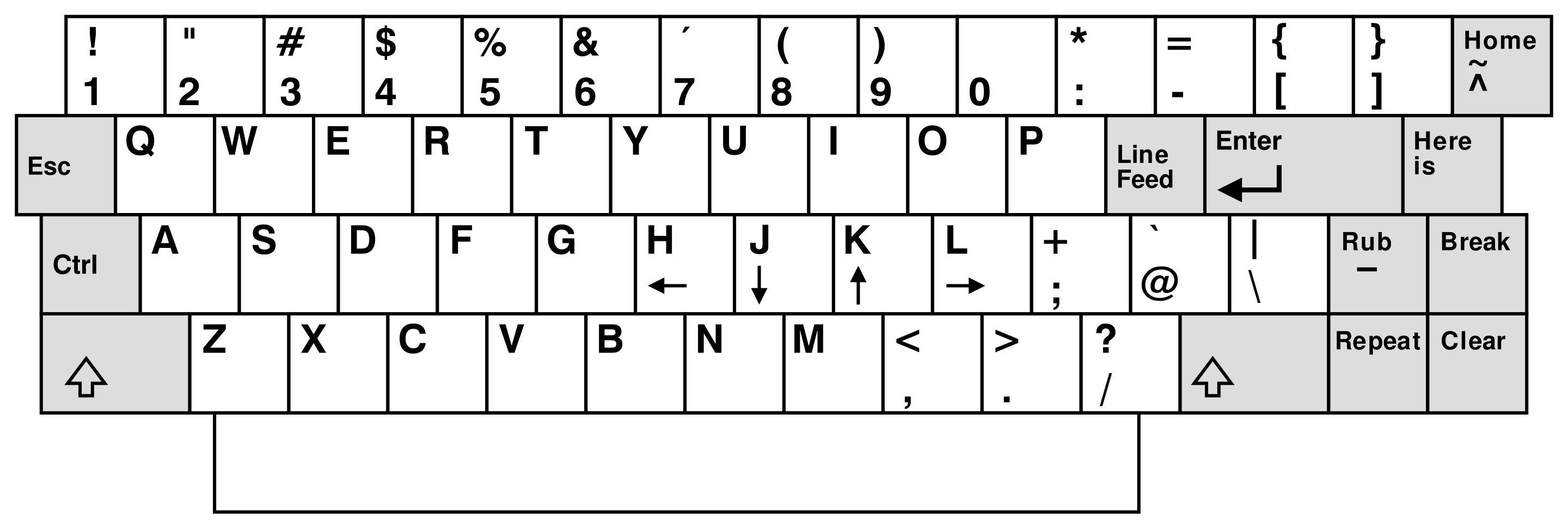
[attach]2515616[/attach]
https://code.yidas.com/linux-vi-vim-command/
[Linux] vi 與 vim 指令一覽表整理 (Cheat Sheet) – YIDAS Code
shutdown -p now ❌ 會shutdown 再freezing @ bios screen
poweroff ❌ 同上
用apm:
#/etc/rc.suspend apm 5 indicating led light for power was blinking
#acpiconf -s 5 選項不可用:acpiconf: invalid sleep type (5)
#acpiconf -s 4 OK S4 hibernate2disk
#chmod +x /etc/rc.shutdown;/etc/rc.shutdown 無效,xfce4 & services were closes but not power off
https://openzfs.github.io/openzfs-docs/Getting Started/Debian/index.html
debian zfs zpool package唔係內核態運行,係fuse in userspace,似乎係license問題,GNU/Linux LUKS LUKS2 LVM2係GPL license,zfs係BSD license
tier1:dkms libnvpair3linux libuutil3linux libzfs6linux libzpool6linux zfs-dkms zfs-zed zfsutils-linux
tier2:linux-headers-amd64 linux-headers-6.12.73+deb13-amd64 linux-headers-6.12.73+deb13-common linux-kbuild-6.12.73+deb13 pahole
https://www.reddit.com/r/freebsd/comments/1acg4wl/mouse_wont_move_in_freebsd_13_in_virtual_machine/
https://forums.freebsd.org/threads/qemu-kvm-freebsd-guest-running-x-and-a-working-mouse.82460/
ps -ax | grep moused
pkg ins utouch-kmod xf86-input-evdev webcamd ❌
echo utouch_load="YES">/boot/loader.conf then reboot ❌
https://forums.freebsd.org/threads/user-management.89920/
https://www.reddit.com/r/freebsd/comments/ppdsiu/remove_user_and_groups_freebsd_13_using_tcsh/
==> You should manually remove the "webcamd" user.
==> You should manually remove the "webcamd" group
pw userdel -r webcamd
rmuser webcamd
pw groupdel webcamd or pw groupdel <gid>
https://docs.freebsd.org/en/books/handbook/desktop/
conclusion總結:USB mouse無法使用,及唔知點安裝audio output的packages,建議用kde pkg ins sddm plasma6-plasma konsole,Z97 + 5代U sddm kde Xorg X11同wayland 都用到USB mouse,X79 + Xeon E5 v2 sddm kde 得wayland用到USB mouse Xorg X11唔得,同一款网購USB mouse。but wayland下用唔到gimp截圖
recover logged-in sessions from freezed screen after S3-suspend-to-ram : service dbus restart;service sddm restart
S3恢復電源狀態之後logout曬all sessions
作者: pipikeung 時間: 2026-2-20 07:04
本帖最後由 pipikeung 於 2026-2-21 07:43 編輯
回覆 11# MSI_R9_280_Gami
「Alpine」的「setup-alpine」安裝與「ArchLinux」的「Archinstall」差不多,都是「選擇題」,小心選擇都可以輕鬆完成安裝。
今次都是用「VirtualBox」來試試安裝,下載ISO檔放在「VirtualBox」中,起動後以「root」登入
01 setup-alpine
起動安裝程序
02 選擇鍵盤佈局
選用US 便可
03 Hostname
預設是localhost,但用了「Alpine」
04 網絡介面 Interface selection
選預設「eth0」及「dhcp」
05 Root Password
預設是沒有,若有需要自行設定
06 Timezone setting
當然昰「Asia/Hong_Kong」
07 Proxy setting
因無使用,直接按「Enter」略過
08 NTP Client
選預設便可
09 Mirror Selection
選了(f) Find and use fastest mirrot
10 Set up a new user
自行加入及設定「password」
11 Some SSH Setting
按需要自行決定
12 分割硬盤
按指示選擇,因安裝在virtualbox中,所以該4項選擇分別是1.none 2.sda 3. sys 4.y
便完成安裝﹗

安裝完成後續設定﹕
重啟系統以「root」登入
13 加添使用者前先安裝「nano」作文字處理器
apk add nano
groups <your-username>
adduser <your-username> wheel
在 /etc/doas.d/doas.conf中加入內容
permit persist :wheel
14 Enable community repositories
nano /etc/apk/repositories中內的URLs前的「#」刪去,存檔登出
15 安裝「xfce4桌面及LightDM」
setup-xorg-base
apk add xfce4 xfce4-terminal xfce4-screensaver lihgtdm-gtk-greeter dbus
rc-service dbus start
rc-update add dbus
16 Enable udev service
setup-devd udev
17 啟動Lightdm
rc-service lightdm start
以「root 」登入後鍵入
rc-update add lightdm
準許「Users」可以關機及重後啟動
apk add elogind polkit-elogind
reboot

大功告成﹗
再加上所需的軟件,便可作「桌面電腦」使用。


正是「太極分兩儀」,「好壞相生」,好處亦是壞處。好處是「個頭細、耗源小、效率高」,壞處正是「個頭細,對系統及軟件支援不足」更堪者是「她」「另闢蹊徑」與「主流Linux」的操作及構建有所不同,或多或小對使用者不便。不太推介使用﹗
作者: MSI_R9_280_Gami 時間: 2026-2-20 12:04
我唔識alpine裝audio output packages,例如pipewire alsa,void musl compile出黎既binary同alpine通用,開箱即用,desktop environments audio,全部齊
void musl唔係純正musl,好似都係glibc2黎
作者: MSI_R9_280_Gami 時間: 2026-2-28 17:30
本帖最後由 MSI_R9_280_Gami 於 2026-3-1 22:52 編輯
由于FreeBSD KDE xorg x11用唔到usb wired mouse,轉用wayland,發覺又幾好用,轉返debian KDE wayland用到fcitx4打字同較亮度。gnome on wayland fcitx4打到字
以前wayland較亮度失敗,仲要打唔到字(唔記得scim定ibus,應該係scim)
X79冇聲,Z97板載聲卡壞左,另外加左張USB聲卡,本身d聲好拆,有少少奇怪係家陣d聲好左好多,同onboard sound card差唔多,懷疑係kernel upgrade左driver,原來以為USB sound card d 聲係咁劣
https://www.reddit.com/r/kde/comments/1re82kv/this_w_icon_for_some_apps/
不過wayland套件icons變左黃底白字W,冇icons rollback to w
用mousepad果陣menu bar閃退 i set to hidden
作者: MSI_R9_280_Gami 時間: 2026-3-1 20:44
本帖最後由 MSI_R9_280_Gami 於 2026-3-2 17:41 編輯
https://www.intel.com/content/www/us/en/docs/dpcpp-cpp-compiler/developer-guide-reference/2024-2/march.html

vi ./Makefile
cc=gcc改為cc=cc
加句-march=ivybridge
root@frei ~# cd /home/frei/Public/SuperPI-main
root@frei /h/f/P/SuperPI-main# make install clean
mkdir -p /usr/local/bin
cp pi_css5 /usr/local/bin
rm -f pi_fftcs.o fftsg_h.o pi_css5
等于cc / clang -Wall -pedantic -O -fomit-frame-pointer -funroll-loops -march=ivybridge -malign-double -c pi_fftcs.c -o pi-libc5-3ʳᵈivybridge
compares to the result in P1#5,FreeBSD libc5 glibc1同debian libc6 glibc2差唔多,不過呢個test閂左 HTT E5-2697 v2 12c24t 變12c12t
唔知點解用普通user permission run $make install clean或者cc clang compile會失敗,一定要root #make install clean
frei@frei ~> pi_css5 1000000000
Calculation of PI using FFT and AGM, ver. LG1.1.2-MP1.5.2a.memsave
initializing...
nfft= 268435456
radix= 1000
error_margin= 0.0929832
calculating 805306368 digits of PI...
AGM iteration
precision= 36: 193.60 sec
precision= 84: 192.70 sec
precision= 168: 192.67 sec
precision= 348: 192.98 sec
precision= 696: 192.84 sec
precision= 1392: 192.78 sec
precision= 2784: 192.38 sec
precision= 5580: 192.38 sec
precision= 11160: 192.95 sec
precision= 22344: 192.73 sec
precision= 44688: 192.81 sec
precision= 89400: 192.95 sec
precision= 178812: 192.30 sec
precision= 357648: 192.40 sec
precision= 715308: 193.02 sec
precision= 1430628: 192.74 sec
precision= 2861280: 192.86 sec
precision= 5722584: 193.08 sec
precision= 11445192: 193.23 sec
precision= 22890408: 192.41 sec
precision= 45780852: 192.79 sec
precision= 91561716: 192.97 sec
precision= 183123468: 192.62 sec
precision= 366246960: 192.74 sec
precision= 732493944: 192.29 sec
precision= 1464987924: 191.79 sec
writing pi805306368.txt...
5538.08 sec. (real time)
frei@frei ~>

vi ./Makefile
cc=gcc改為cc=clang
加句-march=broadwell
終于明點解compilation failed,原來係分開三句,唔係一句
root@frei /h/f/D/SuperPI-main# make install clean
clang -Wall -pedantic -O -fomit-frame-pointer -funroll-loops -march=broadwell -malign-double -c pi_fftcs.c -o pi_fftcs.o
clang -Wall -pedantic -O -fomit-frame-pointer -funroll-loops -march=broadwell -malign-double -c fftsg_h.c -o fftsg_h.o
clang -Wall -pedantic -O -fomit-frame-pointer -funroll-loops -march=broadwell -malign-double pi_fftcs.o fftsg_h.o -lm -static -o pi_css5
mkdir -p /usr/local/bin
cp pi_css5 /usr/local/bin
rm -f pi_fftcs.o fftsg_h.o pi_css5
frei@frei ~/Downloads> pi_css5 1000000000
Calculation of PI using FFT and AGM, ver. LG1.1.2-MP1.5.2a.memsave
initializing...
nfft= 268435456
radix= 1000
error_margin= 0.0923872
calculating 805306368 digits of PI...
AGM iteration
precision= 36: 146.55 sec
precision= 84: 143.56 sec
precision= 168: 145.39 sec
precision= 348: 146.45 sec
precision= 696: 143.79 sec
precision= 1392: 142.20 sec
precision= 2784: 142.21 sec
precision= 5580: 142.21 sec
precision= 11160: 143.32 sec
precision= 22344: 142.30 sec
precision= 44688: 143.66 sec
precision= 89400: 143.22 sec
precision= 178812: 142.02 sec
precision= 357648: 140.20 sec
precision= 715308: 145.98 sec
precision= 1430628: 153.16 sec
precision= 2861280: 153.23 sec
precision= 5722584: 154.82 sec
precision= 11445192: 160.91 sec
precision= 22890408: 154.02 sec
precision= 45780852: 153.78 sec
precision= 91561716: 155.31 sec
precision= 183123468: 149.80 sec
precision= 366246960: 153.25 sec
precision= 732493944: 152.38 sec
precision= 1464987924: 154.88 sec
writing pi805306368.txt...
4262.70 sec. (real time)
but我發覺compiled出黎size非常大
debian@debian:~/Downloads/64Gram Desktop$ ls -al pi-*
-rw-rw-r-- 1 debian debian 4727208 Mar 2 14:21 pi-libc5-3ʳᵈivybridge
-rw-rw-r-- 1 debian debian 4729816 Mar 2 14:21 pi-libc5-5ᵗʰbroadwell
-rw-rw-r-- 1 debian debian 4733704 Mar 2 14:21 pi-libc5-x86-64
-rw-rw-r-- 1 debian debian 89976 Mar 2 14:21 pi-libc6-3ʳᵈivybridge
-rw-rw-r-- 1 debian debian 99848 Mar 2 14:21 pi-libc6-4ᵗʰhaswell
-rw-rw-r-- 1 debian debian 89816 Mar 2 14:21 pi-libc6-5ᵗʰbroadwell
-rw-rw-r-- 1 debian debian 89976 Mar 2 14:21 pi-libc6-x86-64
-rw-rw-r-- 1 debian debian 92136 Mar 2 14:21 pi-voidMUSL-3ʳᵈivybridge
-rw-rw-r-- 1 debian debian 92136 Mar 2 14:21 pi-voidMUSL-4ᵗʰhaswell
-rw-rw-r-- 1 debian debian 92136 Mar 2 14:21 pi-voidMUSL-5ᵗʰbroadwell
# unzip screenfetch-c-master.zip
# cd screenfetch-c-master
# make install clean
make: /mpt/mpt/Public/screenfetch-c-master/Makefile:25: Invalid line "ifeq ($(COLORS),0)", expanded to "ifeq "
make: /mpt/mpt/Public/screenfetch-c-master/Makefile:27: Invalid line "endif"
make: /mpt/mpt/Public/screenfetch-c-master/Makefile:28: warning: Invalid character " " in variable name "shell gcc -dumpmachine"
make: /mpt/mpt/Public/screenfetch-c-master/Makefile:28: warning: Invalid character " " in variable name "findstring mingw,"
make: /mpt/mpt/Public/screenfetch-c-master/Makefile:28: Invalid line "ifneq (,$(findstring mingw,$(shell $(CC) -dumpmachine)))", expanded to "ifneq "
make: /mpt/mpt/Public/screenfetch-c-master/Makefile:30: Invalid line "endif"
make: /mpt/mpt/Public/screenfetch-c-master/Makefile:31: Invalid line "ifeq ($(OS),Windows_NT)", expanded to "ifeq "
make: /mpt/mpt/Public/screenfetch-c-master/Makefile:32: warning: duplicate script for target "ifeq" ignored
make: Makefile:26: warning: using previous script for "ifeq" defined here
make: /mpt/mpt/Public/screenfetch-c-master/Makefile:33: warning: duplicate script for target "ifeq" ignored
make: Makefile:26: warning: using previous script for "ifeq" defined here
make: /mpt/mpt/Public/screenfetch-c-master/Makefile:34: warning: duplicate script for target "ifeq" ignored
make: Makefile:26: warning: using previous script for "ifeq" defined here
make: /mpt/mpt/Public/screenfetch-c-master/Makefile:35: warning: duplicate script for target "ifeq" ignored
make: Makefile:26: warning: using previous script for "ifeq" defined here
make: /mpt/mpt/Public/screenfetch-c-master/Makefile:36: Invalid line "else"
make: /mpt/mpt/Public/screenfetch-c-master/Makefile:66: Invalid line "endif"
make: /mpt/mpt/Public/screenfetch-c-master/Makefile:68: warning: Invalid character " " in variable name "wildcard ./src/*.c"
make: Fatal errors encountered -- cannot continue
make: stopped making "install clean" in /mpt/mpt/Public/screenfetch-c-master
作者: MSI_R9_280_Gami 時間: 2026-3-2 17:57
本帖最後由 MSI_R9_280_Gami 於 2026-4-9 21:55 編輯
debian bookworm冇fetch freecolor slingshot fatrat,要自己compile就算9數
fatrat被移除,似乎係maintainer已棄project潛逃
https://github.com/ryanakca/slingshot
https://community.linuxmint.com/software/view/slingshot
https://flathub.org/zh-Hant/apps/com.github.ryanakca.slingshot
https://github.com/LubosD/fatrat
https://manpages.ubuntu.com/manpages/trusty/man1/fatrat.1.html
https://askubuntu.com/questions/699568/how-to-install-fatrat
http://ftp.ubuntu.com/ubuntu/ubuntu/pool/universe/f/fatrat/
on software turned off CPU cores:echo 0 > /sys/devices/system/cpu/cpu11/online ( linux kernel only doesn't work on freebsd)
warning: Path '/sys' does not exist
check ip
$curl ifconfig.me
$curl icanhazip.com
$curl api.ipify.org
root@frei ~# tty
/dev/pts/1
dd if=/dev/random of=/tmp/a bs=4 count=1;cat /tmp/a
dd if=/dev/urandom of=/tmp/a bs=4 count=1;cat /tmp/a
cat /dev/urandom
https://www.reddit.com/r/linux4noobs/comments/1sfbjrj/any_solution_for_data_recovery_using_linux_mint/
lsblk -f
ls -alh
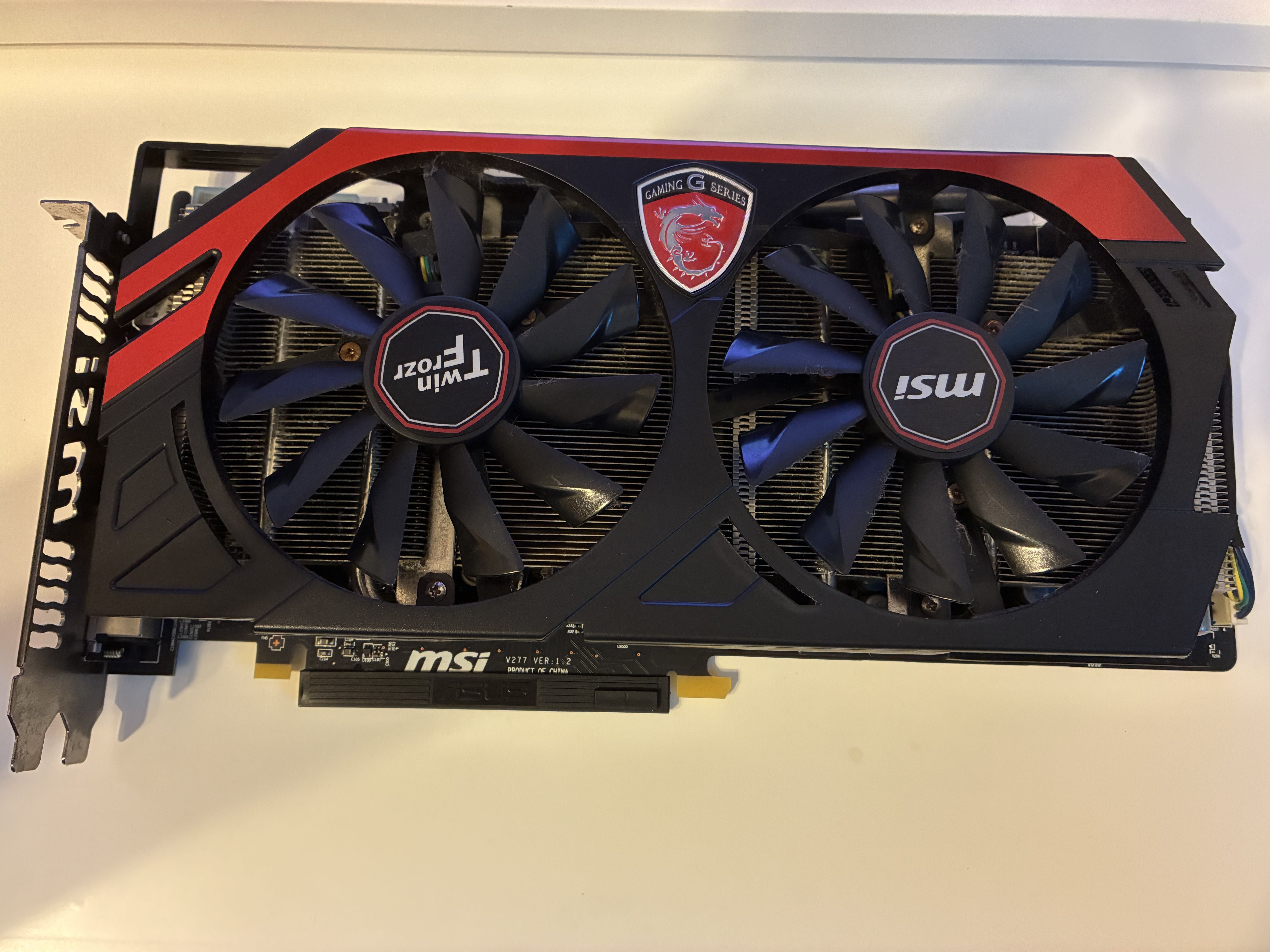
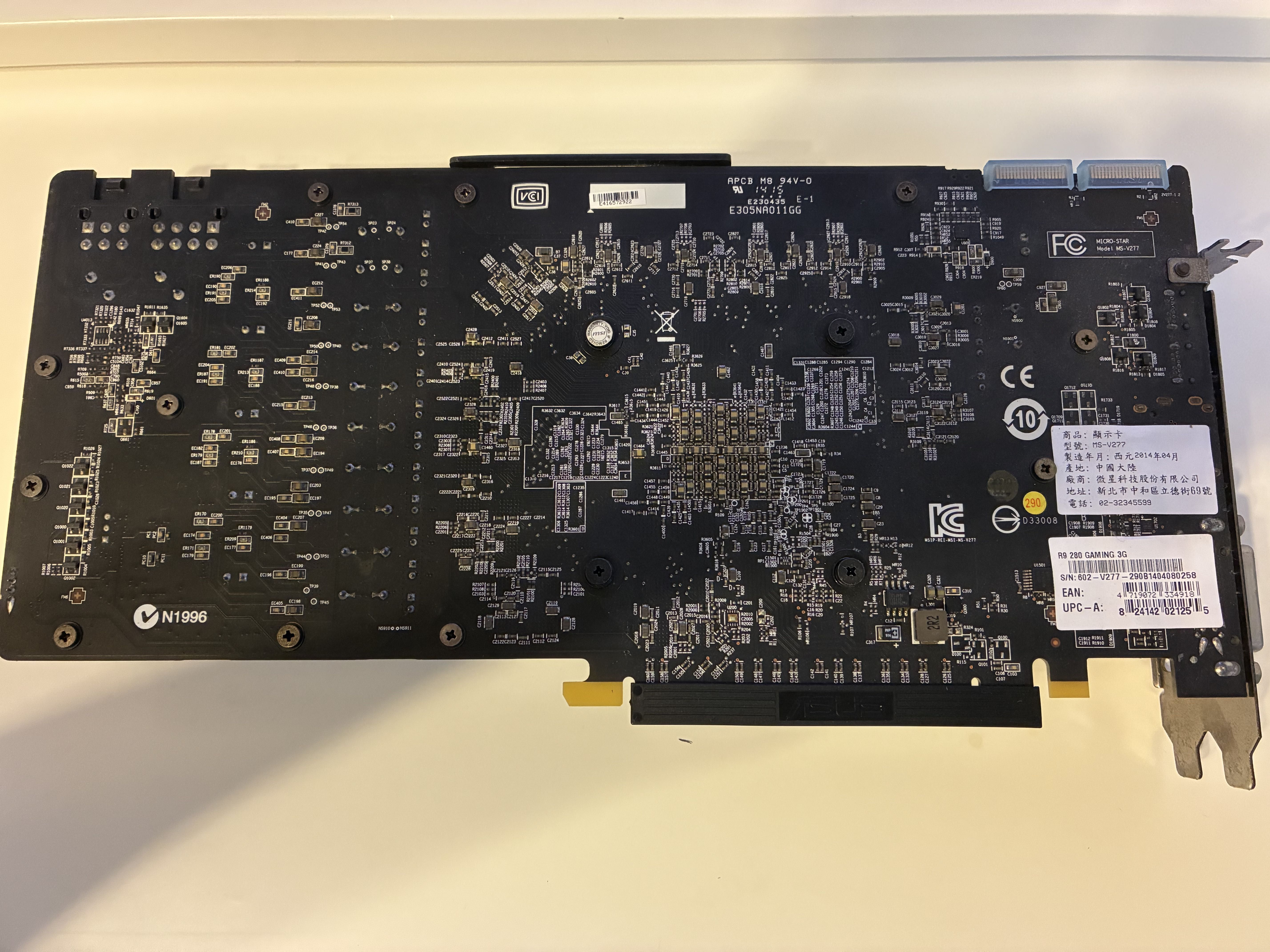
作者: MSI_R9_280_Gami 時間: 2026-3-6 15:16
本帖最後由 MSI_R9_280_Gami 於 2026-3-17 18:04 編輯
比較glibc2 libc6 linux同freebsd(libc5 glibc1),linux順手好多,支援硬件多,drivers多,軟件豐富,少bugs
alpine同void musl比,void musl唔係真正musl,只係glibc2外面加層wrapper,void musl xfce有聲,out-of-the-box experience,alpine點舞掂佢有聲,唔清楚
最大路係debian apt dpkg glibc2 libc6
尋日拆風冷出黎清洗,順路將E5-2697 v2 12C24T換2667 v2 8C16T,發現仍然只可以DDR3-1866 max,唔可以OC zu 2133mt/s,XEON E5 E7 uncore共compute cores鎖左TDP功率für rack servers im 機房 24-7-365,為左控制功耗power CPU 同DDR freq都冇得超頻,得xeon E3共i core系列可以超
E5-2667 v2同E3-1285L v4比較run super pi,唔知點,gen 5ᵗʰ broadwell有128MB L4 cache,又可以OC。X99 X299同X79好似都冇乜差別,X99 + E5-2667 v4只比X79 + E5 v2遲兩代,又冇得超頻,分分鐘同Z97 + E3-1285L v4拉唔開差距。X299不如threadripper,底板同U又零舍貴
同樣DDR3 socket 2011 X79 sandybridge,i7-3820(Gen 2ʳᵈ sandybridge)應該有得超頻CPU同DDR3,E5-2630 suffix0唔得。i7-3820類似 -x 或 -xe suffix,跑分介乎i7-3770至i7-4770,但功耗相當不美麗,優點係北橋uncore iodie 勁d(more PCIE DDR channels)
well,原來gamemax遊戏帝国公司係大陸野
https://www.clearesult.com/80plus/sites/80plus/files/manufacturer-certificate/gamemax-gp500-8465.pdf
GUANGDONG SOHOO TECHNOLOGY CO., LTD.=广东迅扬电脑科技股份有限公司,同1ST PLAYER TECHNOLOGY(GUANGZHOU) CO.,LTD應該唔係同一間公司
==updated==
比起E5-4650 4657L 2697 v2,換左2667 v2之後,明顯感覺快好多,冇原先咁嘈同熱,睇黎知乎大陸仔確實講得冇錯:少核高頻率好過多核低頻。雖然係3代ivybridge,感覺同i7-3770 4770 E3-1271 v3比冇乜差距。不過普通icore可以超頻,應該強好多。E3-1285L v4 + Z97可以上到DDR3-2200mt/s,xeon限制耗電量,只得1866mt/s,run sysbench 4通道1866mt/s bandwidth仲不及2200mt/s 2通道
sandybridge E5-2630 i7-3820算9數
debian@debian:~/Music$ ./pi-libc6-3ʳᵈivybridge 1000000000
Calculation of PI using FFT and AGM, ver. LG1.1.2-MP1.5.2a.memsave
initializing...
nfft= 268435456
radix= 1000
error_margin= 0.0882149
calculating 805306368 digits of PI...
AGM iteration
precision= 36: 163.27 sec
precision= 84: 162.57 sec
precision= 168: 163.14 sec
precision= 348: 163.16 sec
precision= 696: 162.37 sec
precision= 1392: 162.68 sec
precision= 2784: 162.24 sec
precision= 5580: 162.98 sec
precision= 11160: 162.23 sec
precision= 22344: 161.64 sec
precision= 44688: 161.70 sec
precision= 89400: 161.86 sec
precision= 178812: 161.81 sec
precision= 357648: 161.85 sec
precision= 715308: 161.82 sec
precision= 1430628: 161.77 sec
precision= 2861280: 162.53 sec
precision= 5722584: 163.72 sec
precision= 11445192: 162.50 sec
precision= 22890408: 161.90 sec
precision= 45780852: 161.70 sec
precision= 91561716: 161.96 sec
precision= 183123468: 162.00 sec
precision= 366246960: 161.94 sec
precision= 732493944: 161.96 sec
precision= 1464987924: 162.02 sec
writing pi805306368.txt...
4661.21 sec. (real time)
XEON E5-2667 v2對比返#5 用2697 v2係5407 seconds,用ImageMagick morify轉相都快左。super pi好似話剩係食單核,但mogrify單核性能,多核性能兩樣都食,最主要少核高頻率好過多核低頻
debian@debian:~/Music$ sysbench cpu --cpu-max-prime=5000000 --threads=16 --events=1 run
sysbench 1.0.20 (using system LuaJIT 2.1.1700206165)
Running the test with following options:
Number of threads: 16
Initializing random number generator from current time
Prime numbers limit: 5000000
Initializing worker threads...
Threads started!
CPU speed:
events per second: 0.16
General statistics:
total time: 6.1348s
total number of events: 1
Latency (ms):
min: 6134.72
avg: 6134.72
max: 6134.72
95th percentile: 6135.91
sum: 6134.72
Threads fairness:
events (avg/stddev): 0.0625/0.24
execution time (avg/stddev): 0.3834/1.48
debian@debian:~/Music$ sysbench cpu --cpu-max-prime=50000000 --threads=16 --events=1 run
sysbench 1.0.20 (using system LuaJIT 2.1.1700206165)
Running the test with following options:
Number of threads: 16
Initializing random number generator from current time
Prime numbers limit: 50000000
Initializing worker threads...
Threads started!
CPU speed:
events per second: 0.01
General statistics:
total time: 161.8984s
total number of events: 1
Latency (ms):
min: 161898.30
avg: 161898.30
max: 161898.30
95th percentile: 100000.00
sum: 161898.30
Threads fairness:
events (avg/stddev): 0.0625/0.24
execution time (avg/stddev): 10.1186/39.19
debian@debian:~/Music$ sysbench memory --memory-block-size=2GB --memory-total-size=200GB run
sysbench 1.0.20 (using system LuaJIT 2.1.1700206165)
Running the test with following options:
Number of threads: 1
Initializing random number generator from current time
Running memory speed test with the following options:
block size: 2097152KiB
total size: 204800MiB
operation: write
scope: global
Initializing worker threads...
Threads started!
Total operations: 49 ( 4.84 per second)
100352.00 MiB transferred (9908.17 MiB/sec)
General statistics:
total time: 10.1265s
total number of events: 49
Latency (ms):
min: 205.79
avg: 206.65
max: 214.62
95th percentile: 207.82
sum: 10125.74
Threads fairness:
events (avg/stddev): 49.0000/0.00
execution time (avg/stddev): 10.1257/0.00
#2 Pic 5 set錯parameter,E3-1285L v4係4c8t,難怪咁快原來set左 --threads=24,所以要test下呢個 --threads=N係咪指處理器硬件綫程
debian@debian:~$ sysbench cpu --cpu-max-prime=50000000 --threads=64 --events=1 run
sysbench 1.0.20 (using system LuaJIT 2.1.1700206165)
Running the test with following options:
Number of threads: 64
Initializing random number generator from current time
Prime numbers limit: 50000000
Initializing worker threads...
Threads started!
CPU speed:
events per second: 0.01
General statistics:
total time: 161.7907s
total number of events: 1
Latency (ms):
min: 161790.69
avg: 161790.69
max: 161790.69
95th percentile: 100000.00
sum: 161790.69
Threads fairness:
events (avg/stddev): 0.0156/0.12
execution time (avg/stddev): 2.5280/20.07
debian@debian:~$ sysbench cpu --cpu-max-prime=50000000 --threads=256 --events=1 run
sysbench 1.0.20 (using system LuaJIT 2.1.1700206165)
Running the test with following options:
Number of threads: 256
Initializing random number generator from current time
Prime numbers limit: 50000000
Initializing worker threads...
Threads started!
CPU speed:
events per second: 0.01
General statistics:
total time: 162.2814s
total number of events: 1
Latency (ms):
min: 162281.30
avg: 162281.30
max: 162281.30
95th percentile: 100000.00
sum: 162281.30
Threads fairness:
events (avg/stddev): 0.0039/0.06
execution time (avg/stddev): 0.6339/10.12
依然非常慢,E3-1285L v4好似快過E5-2667 2697 v2,128MB L4 cache等于amd x3d,E5-2697A v4 16c32t 40MB L3 cache,2696 2699 v4 55MB,難怪話5代U可以越級打8代9代甚至10代(4核U 2核U)
https://www.techbang.com/posts/127766-ryzen-9950x3d2-208mb-cache-exposed
208MB 快取容量怪獸!AMD Ryzen 9 9950X3D2 處理器意外曝光 | T客邦
9950X3D2:L2 cache 16MB、L3 cache 96MB x2 共208MB;;E3-1285L v4 E3-1285 v4 i7-5775C i7-5675C都有128MB L4 cache,亦多過5500X3D,感覺上super pi食memory同 CPU L? caches多。同埋二通道未必差過4通道,DDR5 dual channels 應該好過DDR3 quad-chs
https://www.hkepc.com/25235/AM4_入門打機之王_...__AMD_Ryzen_5_5500X3D_評測

https://zhuanlan.zhihu.com/p/376478658
从架构层面上看,Broadwell属于Tick-Tock中Tick的一环,亦即它的架构相比Haswell并未有显著的修改。CPU层面的提升大约5%的IPC提升、浮点指令集延迟更低、扩大的二层TLB缓存,基本无伤大雅,但GPU层面就有很大的长进
https://www.cpubenchmark.net/compare/2154vs2830vs2743vs3444vs3593/Intel-Xeon-E5-2667-v2-vs-Intel-Xeon-E5-2667-v4-vs-Intel-Xeon-E3-1285L-v4-vs-Intel-i5-9500-vs-Intel-i9-9900KS
sabertooth X79 + E5-2667 v2 + freebsd + 64GB DDR3-1866mt/s,之前results係E5-2697 v2
frei@frei ~/Downloads> ./pi-libc5-3ʳᵈivybridge 1000000000
Calculation of PI using FFT and AGM, ver. LG1.1.2-MP1.5.2a.memsave
initializing...
nfft= 268435456
radix= 1000
error_margin= 0.0929832
calculating 805306368 digits of PI...
AGM iteration
precision= 36: 173.86 sec
precision= 84: 173.20 sec
precision= 168: 172.92 sec
precision= 348: 172.73 sec
precision= 696: 172.41 sec
precision= 1392: 172.40 sec
precision= 2784: 172.45 sec
precision= 5580: 172.32 sec
precision= 11160: 173.15 sec
precision= 22344: 172.40 sec
precision= 44688: 172.45 sec
precision= 89400: 172.68 sec
precision= 178812: 172.45 sec
precision= 357648: 172.20 sec
precision= 715308: 172.30 sec
precision= 1430628: 172.20 sec
precision= 2861280: 172.45 sec
precision= 5722584: 172.56 sec
precision= 11445192: 173.58 sec
precision= 22890408: 172.83 sec
precision= 45780852: 172.61 sec
precision= 91561716: 173.23 sec
precision= 183123468: 173.49 sec
precision= 366246960: 174.84 sec
precision= 732493944: 172.90 sec
precision= 1464987924: 173.47 sec
writing pi805306368.txt...
4965.51 sec. (real time)
作者: MSI_R9_280_Gami 時間: 2026-3-8 20:13
本帖最後由 MSI_R9_280_Gami 於 2026-3-18 15:57 編輯
reiser5,即reiserfs 5.1.3,只可以喺debian bullseye 11 ( previous of previous debian stable )用,bookworm 12 ( previous stable release) trixie 13 ( current stable release of debian ) ❌ unavailable
我懷疑reiser5好用過B tree fs同bcachefs
https://metztli.it/sites/default/files/xonecuiltzin-5.13.19-reizer4-sfrn-5.1.3.mp4
由于linux kernel只支援reiserfs(早期version),reiser5好似requires being run in kernel 所以無法使用,fuse都唔得
雖然德國hans reiser殺左佢俾錢買返黎的俄羅斯老婆,不過reiserfs係好野黎,可能要等到Linus Torvalds死左,reiserfs先至可以重返the kernel
作者: MSI_R9_280_Gami 時間: 2026-3-17 17:04
本帖最後由 MSI_R9_280_Gami 於 2026-3-29 22:56 編輯
45nm socket 775 Xeon X3320
userdel void -r
useradd void -m -d /home/musl -p qwerty123
p2#18 -march=x86-64>core2>penryn
https://en.wikipedia.org/wiki/Penryn_(microarchitecture)
https://zh.wikipedia.org/zh-hk/酷睿2
P45 + x3320,DDR2 2GB x4,發覺run super pi滿左ram,再check真d發覺有條ram有大量errors,super pi都幾食ram
呢個super pi同windows的super pi唔係同一樣野,只係用同一個formula
高斯-勒讓德演算法是一種用於計算圓周率(π)的演算法。它以迅速收斂著稱,只需25次迭代即可產生π的4500萬位正確數字。不過,它的缺點是主記憶體密集,因此有時它不如梅欽類公式使用廣泛。
SYSTEM MEMORY SUMMARY:
mem_used: 14825287680 ( 14138MB) [ 43%] Logically used memory
mem_used: 29652815872 ( 28279MB) [ 86%] Logically used memory
root@frei ~# freecolor -tmo
total used free shared buffers cached
Mem: 31648 27071 4577 0 0 0
Swap: 4099 0 4099
Total: 35747 = ( 27071 (used) + 8676 (free))
呢個pi係非常食ram無怪乎5代broadwell有好大優勢(128MB L4 cache),我感覺compression decompression X79 + Xeon E5 v2 ivybridge 12C24T 8C16T 10C20T快過broadwell 4C8T
CPU-X on FreeBSD 15
[attach]2519130[/attach]
[attach]2519131[/attach]
以broadwell 4C8T 128MB L4 cache計,平均每核32MB,7995WX 9995WX 9654 9754 9755 9965過百核,L3 cache有3GB先至係同等規模
threadripper 7995WX
L2 Cache: 96 x 1024 KB
L3 Cache: 384 MB
threadripper 9995WX
L2 Cache: 96 x 1024 KB
L3 Cache: 384 MB
Cache
Cache L1: 64 KB (per core)
Cache L2: 1 MB (per core)
Cache L3: 384 MB (shared)
384MB/96cores=4MB/core
GA-Z97-HD3 REV:2.0 + E3-1285L v4 + 32GB DDR3-2000mt/s + freebsd
frei@frei ~/Downloads> ./pi-libc5-5ᵗʰbroadwell 1000000000
Calculation of PI using FFT and AGM, ver. LG1.1.2-MP1.5.2a.memsave
initializing...
nfft= 268435456
radix= 1000
error_margin= 0.0923872
calculating 805306368 digits of PI...
AGM iteration
precision= 36: 110.09 sec
precision= 84: 108.91 sec
precision= 168: 109.48 sec
precision= 348: 109.84 sec
precision= 696: 109.24 sec
precision= 1392: 109.31 sec
precision= 2784: 109.95 sec
precision= 5580: 113.23 sec
precision= 11160: 114.52 sec
precision= 22344: 110.56 sec
precision= 44688: 114.02 sec
precision= 89400: 113.46 sec
precision= 178812: 111.84 sec
precision= 357648: 111.12 sec
precision= 715308: 109.91 sec
precision= 1430628: 109.52 sec
precision= 2861280: 111.36 sec
precision= 5722584: 112.65 sec
precision= 11445192: 112.54 sec
precision= 22890408: 113.42 sec
precision= 45780852: 110.51 sec
precision= 91561716: 110.46 sec
precision= 183123468: 110.41 sec
precision= 366246960: 112.32 sec
precision= 732493944: 115.41 sec
precision= 1464987924: 112.77 sec
writing pi805306368.txt...
3202.91 sec. (real time)
之前提到apm acpi,freebsd應該唔support acpi,反而係優勢,因為4代5代南橋lynx point有bug,會instantly & immediately自動喚醒by usb keyboard,無法S3睡眠。linux要入/proc/acpi閂野,freebsd直頭唔support acpi & wakeup from usb device,只可以用更舊的apm,apm不支援wakeup from usb device,,實際上freebsd進入S3前斷左USB signal
freebsd 冇 /proc呢個virtual filesystem for processes
#cat /proc/acpi/wakeup;echo EHC1 > /proc/acpi/wakeup;echo EHC2 > /proc/acpi/wakeup;echo XHC > /proc/acpi/wakeup;echo PTXH > /proc/acpi/wakeup
mageia原來有ImageMagick同F3,freebsd個F3完全用唔到
https://madb.mageialinux-online.org/show?distribution=9&architecture=x86_64&rpm=imagemagick&repo=&group=&page=
https://madb.mageialinux-online.org/show?distribution=9&architecture=x86_64&rpm=f3&repo=&group=&page=
root@localhost ~# f3fix --last-sec=61502207 /dev/sdb
F3 fix 8.0
Copyright (C) 2010 Digirati Internet LTDA.
This is free software; see the source for copying conditions.
Drive `/dev/sdb' was successfully fixed
root@localhost ~# lsblk
NAME MAJ:MIN RM SIZE RO TYPE MOUNTPOINTS
sda 8:0 0 465.8G 0 disk
├─sda1 8:1 0 512M 0 part /boot/EFI
├─sda2 8:2 0 4G 0 part [SWAP]
├─sda3 8:3 0 40G 0 part /
├─sda4 8:4 0 391.2G 0 part
│ └─a 252:0 0 391.2G 0 crypt /home
└─sda5 8:5 0 30G 0 part
sdb 8:16 1 125G 0 disk
└─sdb1 8:17 1 29.3G 0 part
root@localhost ~# udisksctl power-off -b /dev/sdb
mageia@localhost ~/Downloads> date;fish fish;date
Wednesday, March 18, 2026 PM04:29:19 HKT
mogrify: no decode delegate for this image format `HEIC' @ error/constitute.c/ReadImage/746.
Wednesday, March 18, 2026 PM04:29:20 HKT
233 56s/8 2p 32GB 2ch 2000mt/s CL11-11-11-28 Z97 1285L v4 mageia appimage x profile
mageia@localhost ~/Downloads> date;fish fish;date
Wednesday, March 18, 2026 PM04:37:16 HKT
Wednesday, March 18, 2026 PM04:41:09 HKT
mageia@localhost ~/Downloads> date;fish fish;date
Wednesday, March 18, 2026 PM05:43:01 HKT
Wednesday, March 18, 2026 PM05:43:57 HKT
root@localhost ~# cryptsetup luksFormat /dev/sdb1 --type=luks2 --pbkdf=argon2id
WARNING: Device /dev/sdb1 already contains a 'exfat' superblock signature.
WARNING: Device /dev/sdb1 already contains a 'dos' partition signature.
WARNING!
========
This will overwrite data on /dev/sdb1 irrevocably.
Are you sure? (Type 'yes' in capital letters): YES
Enter passphrase for /dev/sdb1:
Verify passphrase:
另一個之前反映過既問題,S3 suspend-to-ram之後网絡失效要reload,只出現在mageia 9上,Sabertooth X79 P9X79 H81 B85 Z97都出現類似情況,有可能關lynx point南橋事,睡眠suspend後南橋閂左网絡,冇開返
root@localhost ~# systemctl suspend
root@localhost ~# service network restart
Restarting network (via systemctl): [ OK ]
root@localhost ~#
作者: MSI_R9_280_Gami 時間: 2026-3-29 20:44 標題: days ago failed to install netbsd nor openbsd
本帖最後由 MSI_R9_280_Gami 於 2026-3-29 20:52 編輯
ghostBSD midnachtBSD dragonflyBSD太冷門。估唔到netbsd openbsd難裝過freebsd咁多
netbsd篇
https://book.bsdcn.org/di-27-zhang-netbsd-xi-tong-ru-men/di-27.2-jie-an-zhuang-yu-pei-zhi
27.2 NetBSD 安装示例 | FreeBSD 中文社区
https://itsfoss.community/t/doing-a-hard-install-of-netbsd/14718
Doing a hard install of NetBSD - Other Distributions - It's FOSS Community
die fs aus freebsd est ufs aka ffs called FFSv2 im netbsd , netbsd chooses FFSv2ea
mountpoint /boot/efi/ IN newfs & install
mountpoint / N newfs
dont choose B for boot
x: Partition sizes ok
f: Fetch and unpack pkgsrc 安裝pkgin
x:
installed successfully but failed zu install pkgin the package manager
k: Enable xdm x display manager
dmesg | grep 'wd\|sd’
mbrlabel wd0
mbrlabel sd0
mbrlabel sd1
/boot/efi/EFI/boot/bootia32.efi
/boot/efi/EFI/boot/bootx64.efi
shutdown -p now
openbsd篇
E using fdisk
edit 0
EF
edit ?
A6 data disk for openbsd
double input passphrase ob wenn encryption was enabled
installation failed
搞完一輪發覺始終void musl好用過freebsd 15。試過ubuntu fedora debian openS.u.S.E. tumbleweed mageia void alt alpine freebsd
https://voidlinux.org/packages/?arch=x86_64-musl&q=mesa-vdpau
想用$wget dl an image,發覺原來仲未裝,再#xbps-install wget,發覺mirror用唔到,想用#xmirror,發覺又未裝,原來可以手動改,唔經#xmirror
https://docs.voidlinux.org/xbps/repositories/mirrors/changing.html
root@void ~# cat /etc/xbps.d/00-repository-main.conf
repository=https://mirror.meowsmp.net/voidlinux/current/musl
vi edit it轉做
https://repo-default.voidlinux.org/current/musl/
難怪之前一路更新唔到套件,原來 /etc/apk/repositories 炒左
https://wiki.alpinelinux.org/wiki/Finding_the_fastest_mirror
https://wiki.alpinelinux.org/wiki/How_to_setup_a_Alpine_Linux_mirror
https://mirrors.alpinelinux.org/
https://www.reddit.com/r/AlpineLinux/comments/vujyrc/manually_adding_mirrors/
https://wiki.alpinelinux.org/wiki/Repositories#Overview
https://pkgs.alpinelinux.org/package/v3.23/main/x86_64/fish
H81M-K i7-4770 DDR3 8GB x2 alpine musl
alpine@alpine ~/Downloads> ./pi-voidMUSL-4ᵗʰhaswell 1000000000
Calculation of PI using FFT and AGM, ver. LG1.1.2-MP1.5.2a.memsave
initializing...
nfft= 268435456
radix= 1000
error_margin= 0.0882149
calculating 805306368 digits of PI...
AGM iteration
precision= 36: 170.39 sec
precision= 84: 167.71 sec
precision= 168: 164.40 sec
precision= 348: 166.66 sec
precision= 696: 174.29 sec
precision= 1392: 167.33 sec
precision= 2784: 173.09 sec
precision= 5580: 173.08 sec
precision= 11160: 172.60 sec
precision= 22344: 173.36 sec
precision= 44688: 170.75 sec
precision= 89400: 168.38 sec
precision= 178812: 174.79 sec
precision= 357648: 173.45 sec
precision= 715308: 169.26 sec
precision= 1430628: 168.68 sec
precision= 2861280: 169.05 sec
precision= 5722584: 170.32 sec
precision= 11445192: 171.03 sec
precision= 22890408: 172.13 sec
precision= 45780852: 167.45 sec
precision= 91561716: 166.08 sec
precision= 183123468: 166.51 sec
precision= 366246960: 151.88 sec
precision= 732493944: 152.00 sec
precision= 1464987924: 149.10 sec
writing pi805306368.txt...
4788.10 sec. (real time)
alpine個firefox musl成日crashes,尤其係zhihu view content source。#shutdown用唔到,用返freebsd經驗#poweroff OK
作者: MSI_R9_280_Gami 時間: 2026-3-29 20:45 標題: about using Xeon E5 paired mit X79 & Xeon E3 mit Z97 / H97
本帖最後由 MSI_R9_280_Gami 於 2026-4-16 09:28 編輯
發覺i7-4770明顯慢過3代E5同5代E3,尤其tar -c -x -vf -z -j -J zstd 壓縮解壓縮(compress extract view-processes forced)
https://tieba.baidu.com/p/10479327763
晒一下上个月入的2673V2(95大元)【至强吧】_百度贴吧
😝 不玩4K,这U根本吃不满的,别看是V2,照样算力过剩
😝 日常根本没机会满载,我的2687只用三热管[滑稽]
😝 E5-2687W v2>2673 v2>2667 v2,2687是满血版,2673是节能版,2667是标准版
😝 E5-2687W v2是Xeon E5 v2的天花板,属于收藏的情怀,没必要再买了,反正民用算力永远过剩
https://tieba.baidu.com/p/9614186136
可以说E5性能差,但不能说E5功耗高【至强吧】_百度贴吧
計返時間2024-11-19應該係用緊Sabertooth X79 + E5-4650 v2,channel C unfunctional,懷疑係CL10-10-10-27 8GB 1600mt/s x6,48GB(channel A + B + D 16GB x3),殘血版
debian@debian:~$ ls -la /home/debian/Music/screenfetch/ss.png
-rw-r--r-- 1 debian debian 145765 Nov 19 2024 /home/debian/Music/screenfetch/ss.png
debian@debian:~$ ls -lu /home/debian/Music/screenfetch/ss.png
-rw-r--r-- 1 debian debian 145765 Mar 29 10:12 /home/debian/Music/screenfetch/ss.png
debian@debian:~$ ls -lc /home/debian/Music/screenfetch/ss.png
-rw-r--r-- 1 debian debian 145765 Mar 28 09:52 /home/debian/Music/screenfetch/ss.png

下圖滿血版係E5-2667 v2 4通道ABCD 64GB 1866mt/s CL10-10-10-27 on debian。跑分高過9代i9-9900K,呢個跑分相當有問題,估計剩係計computing dies,冇計到DDR4 bandwidth latency同CPU cache,實際應該係9900K快好多(都係8C16T)。多核性能貼近5600X應該冇乜可能。當然我唔駛睇都知9900 9900K KS KF的16MB L3 cache同E3-1285L v4的128MB L4 cache冇得比
https://www.cpubenchmark.net/compare/3386vs2154vs3334vs3859/Intel-Xeon-E5-4650-v2-vs-Intel-Xeon-E5-2667-v2-vs-Intel-i9-9900K-vs-AMD-Ryzen-5-5600X


H97 Z97可以boot Gen5ᵗʰ broadwell i7-5775C i5-5675C XEON E3-1285 v4 1285L v4,唔止Gen4ᵗʰ haswell。asus個page寫住H97M-E support i7-5775C i5-5675C(但冇寫是否支援Xeon E3 v4) https://www.asus.com/me-en/supportonly/h97me/helpdesk_cpu/
甚至B85 Z87 H87 Q87都可以刷非官方bios更新微碼boot Gen5ᵗʰ broadwell,當然呢個係非正式方法
坊間傳聞B85可以flash bios變H97,Z87可以flash bios變Z97(4代5代共用1150 socket)。我觀察H97塊板幾縮水下,懷疑同B85係同一條產品綫,MOSFET (DrMOS) VRMs果度冇散熱鋁鰭片no aluminum heatsink heatfins heat,就咁暴露喺空氣中,我既ASUS Z87-C GA-Z97-HD3 REV:2.0係有鋁鰭片
H97M-E 有個M.2 (Socket 3) slot
https://dlcdnet.asus.com/pub/ASUS/mb/LGA1150/H97M-E/T9092_H97M-E.pdf
https://en.wikipedia.org/wiki/M.2
PCIe ×4
https://www.reddit.com/r/buildapc/comments/44gza3/discussion_has_anyone_used_broadwell_in_an/
[Discussion] Has anyone used Broadwell in an LGA1150 Z87 motherboard? : r/buildapc
Broadwell is not quite pin compatible with original 1150 boards, as it changes a few power connections (V_PROC_IO now needs 1.05V, new VCCST rail added to power the eDRAM), and requires buffering the THRMTRIP# pin.
apk del libxpm appstream-glib babl libraw gegl inih inih-inireader exiv2-libs gexiv2 libheif libmypaint gimp
H81M-K i7-4770 DDR3-1600 CL11-11-11-30 8GB x2 alpine,呢個网頁跑分果然唔準

GA-Z97-HD3 REV:2.0 E3-1285L v4 extreme oc profile DDR3-2000mt/s CL11-11-11-28 8GB x4 dual channel void musl,感覺唔多準確


E3-1285L v4勁過E5-2667 v2唔多奇。网上見到700蚊有ASUS zenith X399板 + 1920X,南橋散熱heatsink甩左,竟然sold out,又俾奸商執到。800蚊有asus prime X299-deluxe + 7820X。始終太outdated跑分不及新少少的threadripper,冇乜興趣
https://www.cpubenchmark.net/compare/3038vs2830vs2154vs6344vs3837/Intel-i7-7820X-vs-Intel-Xeon-E5-2667-v4-vs-Intel-Xeon-E5-2667-v2-vs-AMD-Ryzen-7-9800X3D-vs-AMD-Ryzen-Threadripper-PRO-3995WX
https://www.cpubenchmark.net/compare/3062vs3354vs3837vs4764vs6693/AMD-Ryzen-Threadripper-1920X-vs-AMD-Ryzen-Threadripper-2920X-vs-AMD-Ryzen-Threadripper-PRO-3995WX-vs-AMD-Ryzen-Threadripper-PRO-5995WX-vs-AMD-Ryzen-Threadripper-PRO-9995WX
https://www.cpubenchmark.net/compare/3625.2vs2814.2vs2750.2vs2753.2/[Dual-CPU]-AMD-EPYC-7282-vs-[Dual-CPU]-Intel-Xeon-E5-2697A-v4-vs-[Dual-CPU]-Intel-Xeon-E5-2696-v4-vs-[Dual-CPU]-Intel-Xeon-E5-2699-v4
XEON E5-4650 v2
Asus Sabertooth X79
48Gb 3 channels 1600mt/s CL9-9-9-24
void musl firefox

作者: MSI_R9_280_Gami 時間: 2026-4-5 21:01
本帖最後由 MSI_R9_280_Gami 於 2026-4-9 21:55 編輯
https://github.com/Jas0nG/RunCat_for_Linux
#xbps-install unzip python3-argcomplete python3-packaging python3-click python3-platformdirs python3-userpath python3-parsing python3-pipx
#pip3 install -r requirements.txt ❌
#pipx install requirements.txt;python3 main.py ❌
failure logfile was stored @ /root/.local/state/pipx/log/*
見到dcfever有850蚊AORUS X470 GAMING PLUS + 5600X,好似好過E5 v2 2690 (¥70) 1680 (¥200) 2687W 2673,原先仲諗住買塊mtx size H97 Z97板(有m2)
X99配E5 v4 2696 2667 2699A 1680太舊又貴,不過AM4再換5600X3D 5800X3D 5950X 配 DDR4好似都幾麻煩。socket 1331 1718 AM4 AM5始終不及2011,maybe swrx8 socket lga 4094 est better
ASRock X570 Creator carousell都係HKD$300,HKD$100買ASUS H97M-E好似好on居
rampage iv gene + E5-1680 v2 overclocked überuhren DDR memory & IO die computing die(rampage iii gene=X58;rampage v gene=X99。maximus iv gene=Z68;maximus v gene=Z77;maximus vi gene=Z87;maximus vii gene=Z97。rampage=hedt maximus=msdt gene=mtx extreme=atx。maximus viii gene / extreme=Z170;maximus ix extreme=Z270)
rog maximus vi formula=z87 ATX
ROG MAXIMUS IX FORMULA=Z270 ATX
ROG MAXIMUS XI HERO=Z390 ATX
互比較,佢4通道32GB 2176mt/s 1DPC 8C16T 3代ivybridge X79 mtx rampage iv gene,我係Z97 ATX 2通道32GB 2000mt/s 2DPC 5代broadwell 4C8T,不過我有128MB L4 cache,E3-1285L v4 65watts非常凉爽
突然諗起之前traded out左96GB recc DDR3:兩條LRDIMM 及寨板X99 DDR3 RDIMM平台,唔知RDIMM 16GB x2 + LRDIMM 32GB x2可否混插?
https://tieba.baidu.com/p/9256712187
【图片】x79超频1680v2 全核心4.5G 内存2176hz_x79吧_百度贴吧

freebsd可以用 tar + brotli 壓縮但無法解壓
root@frei /m/mpt# tar --use-compress-program=brotli -cvf /mpt/mpt/Desktop/a.gz /tmp/*
root@frei /m/mpt# tar -I brotli -cvf /mpt/mpt/Desktop/a.gz /tmp/*
tar: Couldn't open brotli: No such file or directory
root@frei /m/mpt# tar -I [brotli] -cvf /mpt/mpt/Desktop/a.gz /tmp/*
tar: Couldn't open [brotli]: No such file or directory
frei@frei ~/Downloads> tar --use-compress-program=brotli -xvf tar.brotli
failed to write output [con]: Broken pipe
tar: Error opening archive: Child process exited with status 1
frei@frei ~/Downloads [1]> tar -I "brotli" -xvf tar.brotli
tar: Error inclusion pattern: Failed to open 'brotli'
作者: MSI_R9_280_Gami 時間: 2026-4-13 08:45
本帖最後由 MSI_R9_280_Gami 於 2026-4-14 16:58 編輯
C平台見到有塊400蚊板msi mag z690 torpedo,好似幾正,配粒12代13代1700 i3-12100F(HKD$638) 13100F(HKD$660) 4C8T跑分高過E5-1680 v2(淘宝PDD最平要¥350) E5-1680 v4,不過DDR5相當頭痕,非常貴
似乎Z790新d。防縮prevent degrading三部曲:閂細核,更新uefi bios microcodes,用Z板
400蚊有塊4槽DDR5 max 192GB 14代板,另外仲要腰同dram,都係用返3 4 5代X79 H81 Z87 Z97好d
tar --lzma -xvf 7z
tar -I lzma -xvf 7z
tar --use-compress-program=lzma -xvf 7z
作者: MSI_R9_280_Gami 時間: 2026-4-17 14:00
本帖最後由 MSI_R9_280_Gami 於 2026-4-18 00:15 編輯
Sabertooth X79 E5-4650 v2 48GB 3ch 1600mt/s CL9-9-9-24 void musl
compares to P1#4 quad-channel四通道 1866mt/s
compares to P1#5 E5-2697 v2 / i7-4770
root@void ~ [SIGINT]# sysbench cpu --cpu-max-prime=5000000 --threads=20 --events=1 run
sysbench 1.0.20 (using system LuaJIT 2.1.0-beta3)
Running the test with following options:
Number of threads: 20
Initializing random number generator from current time
Prime numbers limit: 5000000
Initializing worker threads...
Threads started!
CPU speed:
events per second: 0.13
General statistics:
total time: 7.4167s
total number of events: 1
Latency (ms):
min: 7416.59
avg: 7416.59
max: 7416.59
95th percentile: 7479.98
sum: 7416.59
Threads fairness:
events (avg/stddev): 0.0500/0.22
execution time (avg/stddev): 0.3708/1.62
root@void ~# sysbench cpu --cpu-max-prime=50000000 --threads=20 --events=1 run
sysbench 1.0.20 (using system LuaJIT 2.1.0-beta3)
Running the test with following options:
Number of threads: 20
Initializing random number generator from current time
Prime numbers limit: 50000000
Initializing worker threads...
Threads started!
CPU speed:
events per second: 0.01
General statistics:
total time: 195.7178s
total number of events: 1
Latency (ms):
min: 195717.70
avg: 195717.70
max: 195717.70
95th percentile: 100000.00
sum: 195717.70
Threads fairness:
events (avg/stddev): 0.0500/0.22
execution time (avg/stddev): 9.7859/42.66
void@void ~> sysbench memory --memory-block-size=2GB --memory-total-size=200GB run
sysbench 1.0.20 (using system LuaJIT 2.1.0-beta3)
Running the test with following options:
Number of threads: 1
Initializing random number generator from current time
Running memory speed test with the following options:
block size: 2097152KiB
total size: 204800MiB
operation: write
scope: global
Initializing worker threads...
Threads started!
Total operations: 37 ( 3.61 per second)
75776.00 MiB transferred (7392.50 MiB/sec)
General statistics:
total time: 10.2479s
total number of events: 37
Latency (ms):
min: 276.08
avg: 276.95
max: 281.51
95th percentile: 277.21
sum: 10247.30
Threads fairness:
events (avg/stddev): 37.0000/0.00
execution time (avg/stddev): 10.2473/0.00
void@void ~/Downloads> ./pi-voidMUSL-3ʳᵈivybridge 1000000000
Calculation of PI using FFT and AGM, ver. LG1.1.2-MP1.5.2a.memsave
initializing...
nfft= 268435456
radix= 1000
error_margin= 0.0882149
calculating 805306368 digits of PI...
AGM iteration
precision= 36: 203.40 sec
precision= 84: 203.11 sec
precision= 168: 202.98 sec
precision= 348: 203.31 sec
precision= 696: 202.88 sec
precision= 1392: 202.45 sec
precision= 2784: 202.07 sec
precision= 5580: 201.79 sec
precision= 11160: 202.37 sec
precision= 22344: 202.10 sec
precision= 44688: 202.13 sec
precision= 89400: 202.81 sec
precision= 178812: 202.02 sec
precision= 357648: 202.24 sec
precision= 715308: 202.47 sec
precision= 1430628: 204.43 sec
precision= 2861280: 205.16 sec
precision= 5722584: 205.81 sec
precision= 11445192: 205.08 sec
precision= 22890408: 203.52 sec
precision= 45780852: 203.32 sec
precision= 91561716: 202.46 sec
precision= 183123468: 202.49 sec
precision= 366246960: 203.70 sec
precision= 732493944: 202.90 sec
precision= 1464987924: 202.33 sec
writing pi805306368.txt...
5838.73 sec. (real time)
作者: MSI_R9_280_Gami 時間: 2026-4-24 11:43 標題: decompression
本帖最後由 MSI_R9_280_Gami 於 2026-4-27 16:15 編輯
commandline
.tar.gz > -z
.tar.bz2 > -j
.tar.xz > -J
brotli N/A
zstd N/A
lzma N/A
lzma篇
FreeBSD 15壓縮左個lzma包,一些linux variants derivants解壓縮lzma原來包喺xz入邊,tar -xJvf target。lzma其實即係microsoft windows的7z。某程度上lzma 7z xz係差不多?
壓縮係
tar --lzma -cvf target source_1 source_2 source_3
tar -I lzma -cvf target source_1 source_2 source_3
tar --use-compress-program=lzma -cvf target source_1 source_2 source_3
unrar篇
.rar係proprietary編碼解碼都係,但解碼器unrar好似限制少d,linux可用 non-free repository
mageia urpmi unrar
https://unix.stackexchange.com/questions/644491/how-can-i-extract-a-rar-file-on-debian
bsdtar -xvf target , which is included in package libarchive-tools
https://packages.debian.org/sid/libarchive-tools
mageia@localhost ~/Downloads> unrar 'resources.rar'
UNRAR 6.23 freeware Copyright (c) 1993-2023 Alexander Roshal
Usage: unrar <command> -<switch 1> -<switch N> <archive> <files...>
<@listfiles...> <path_to_extract/>
<Commands>
e Extract files without archived paths
l[t[a],b] List archive contents [technical[all], bare]
p Print file to stdout
t Test archive files
v[t[a],b] Verbosely list archive contents [technical[all],bare]
x Extract files with full path
<Switches>
- Stop switches scanning
@[+] Disable [enable] file lists
ad[1,2] Alternate destination path
ag[format] Generate archive name using the current date
ai Ignore file attributes
ap<path> Set path inside archive
c- Disable comments show
cfg- Disable read configuration
cl Convert names to lower case
cu Convert names to upper case
dh Open shared files
ep Exclude paths from names
ep3 Expand paths to full including the drive letter
ep4<path> Exclude the path prefix from names
f Freshen files
id[c,d,n,p,q] Display or disable messages
ierr Send all messages to stderr
inul Disable all messages
kb Keep broken extracted files
me[par] Set encryption parameters
n<file> Additionally filter included files
n@ Read additional filter masks from stdin
n@<list> Read additional filter masks from list file
o[+|-] Set the overwrite mode
ol[a] Process symbolic links as the link [absolute paths]
op<path> Set the output path for extracted files
or Rename files automatically
ow Save or restore file owner and group
p[password] Set password
r Recurse subdirectories
sc<chr>[obj] Specify the character set
si[name] Read data from standard input (stdin)
sl<size> Process files with size less than specified
sm<size> Process files with size more than specified
ta[mcao]<d> Process files modified after <d> YYYYMMDDHHMMSS date
tb[mcao]<d> Process files modified before <d> YYYYMMDDHHMMSS date
tn[mcao]<t> Process files newer than <t> time
to[mcao]<t> Process files older than <t> time
ts[m,c,a,p] Save or restore time (modification, creation, access, preserve)
u Update files
v List all volumes
ver[n] File version control
vp Pause before each volume
x<file> Exclude specified file
x@ Read file names to exclude from stdin
x@<list> Exclude files listed in specified list file
y Assume Yes on all queries
mageia@localhost ~/Downloads [7]> unrar e 'resources.rar'
UNRAR 6.23 freeware Copyright (c) 1993-2023 Alexander Roshal
Extracting from resources.rar
Extracting resources OK
Extracting resources OK
Extracting resources OK
Extracting resources OK
Extracting resources OK
Extracting resources OK
Extracting resources OK
Extracting resources OK
Extracting resources OK
Extracting resources OK
Extracting resources OK
Extracting resources OK
Extracting resources OK
Extracting resources OK
Extracting resources OK
Extracting resources OK
All OK
GUI我推介peazip,有.deb .rpm,peazip portable有 based on C的qt、gtk+。both peazip & rar unrar are freewares,實測peazip可以成功解壓縮 .rar file
root@localhost ~# urpmi /home/mageia/Downloads/peazip-11.0.0.LINUX.Qt6-1.x86_64.rpm
SECURITY: The following package is _NOT_ signed (OK ((none))): /home/mageia/Downloads/peazip-11.0.0.LINUX.Qt6-1.x86_64.rpm
installing peazip-11.0.0.LINUX.Qt6-1.x86_64.rpm from /home/mageia/Downloads
Preparing... ##########################################################################################################################################################
1/1: peazip ##########################################################################################################################################################
我認為解壓縮比壓縮重要得多,网路上的資源根本不可能聯絡到原作者並要求提供指定格式,自由度不如自己壓縮。如果冇解壓既工具,下載完個包係冇用
使用peazip作前端 GUI frontend,zpaq ultimate extreme ultra compression ratio size唔係細好多。mageia冇zpaq lpaq *paq呢個套件,要用peazip
> ls -la *.rar *.zpaq
-rw-r--r-- 1 mageia mageia 328514053 Apr 24 00:42 'resources.rar'
-rw-r--r-- 1 mageia mageia 326743023 Apr 24 14:10 'resources.zpaq'
依稀記得十幾年前用peazip壓縮 *paq lpaq zpaq非常慢,現在用快左好多,懷疑係5代U E3-1285L v4有128MB L4 ondie cache,有好大得益。理論上9950X3D2有兩片CCD兩塊大緩存(快取)應該喺dram io密集既任務有優勢。去dram攞料要經uncore的memory controller即係北橋,再出去,再返返入黎,呢段距離用光速行係有延遲。ondie既cache會快好多,即係CL值,幾多個CPU circles dram cycles
呢個portable version aus peazip based on qt都幾搞笑,完全run唔到,要裝左 .rpm version先至run到,缺呢個 libQt6Pas.so libQt6Pas.so.6 libQt6Pas.so.6.2 喺 ./ folder內係soft links by ln -s target link_names,軟鏈結,軟指針指向 ./libQt6Pas.so.6.2.8,一路話缺,我見根本喺 ./ folder 入面存在they were existing,完全冇缺,整極唔得,原來係system folder缺,裝左 .rpm version補返就run到
mageia@localhost ~/Downloads> /home/mageia/Downloads/peazip_portable-11.0.0.LINUX.Qt6.x86_64/peazip
/home/mageia/Downloads/peazip_portable-11.0.0.LINUX.Qt6.x86_64/peazip: error while loading shared libraries: libQt6Pas.so.6: cannot open shared object file: No such file or directory
peazip portable gtk+ 版本質素高好多,冇呢個低能既bug
pezip有些特别的功能,包括但不限于 files comparing comparison,safely erase:「Zero delete」、「Secure delete」
zpaq in an archiver, it's primary and central purpose is to compress folders. You absolutely don't need to make a tar, try again.
zpaq 就是个压缩软件,它最主要、最核心的功能就是压缩文件夹。你完全不需要先打包成 tar,再试试。
zpaq 係一個歸檔工具,佢最主要嘅功能就係壓縮文件夾。你絕對唔需要整 tar 檔,再試吓啦。
Usage: zpaq command archive[.zpaq] files... -options...
zpaq add output.zpaq a b c d -m5
https://www.deploymentresearch.com/data-deduplication-reference-zpaq-benchmarking/
Data Deduplication Reference - ZPAQ Benchmarking - Deployment Research
0~5共5(6)層壓縮級數compression levels
-mtype[Blocksize[.pre[.arg][comp[.arg]]...]]
-method type[Blocksize[.pre[.arg][comp[.arg]]...]]
With "add", select a compression method. type may be 0, 1, 2, 3, 4, 5, "x", or "s". The optional Blocksize may be 0..11,
written with no space after the type, like "-m10" or "-method 511". The remaining arguments, separated by periods or commas
without spaces, are only allowed for types "x" or "s", for example "-mx4.3ci1".
If type is numeric, then higher numbers compress better but are slower. The default is "-m1". It is recommended for
backups. "-m2" compresses slower but decompresses just as fast as 1. It is recommended for archives to be compressed once
and decompressed many times, such as downloads. "-m0" stores with deduplication but no further compression.
我都幾肯定zpaq係記憶體密集的process,E3-1285L v4(peazip qt on mageia)同E5-2667 v2(peazip gtk+ / commandline zpaq on debian)大概要4.7分鐘。peazip壓出黎size恆定係326743023 326743021(懷疑係folder name改左所以略有變化),用commandline zpaq細500 bytes左右
-rw-rw-r-- 1 root root 326742516 Apr 24 19:43 a.zpaq
Fri Apr 24 07:15:19 PM HKT 2026
Fri Apr 24 07:20:12 PM HKT 2026
Fri Apr 24 07:38:47 PM HKT 2026
275.516 seconds (all OK)
Fri Apr 24 07:43:23 PM HKT 2026
debian安裝係#apt-get install libarchive-tools zpaq;apt-get install ./peazip_11.0.0.LINUX.GTK2-1_amd64.deb
remove #apt-get purge libarchive-tools zpaq peazip
#urpme unrar peazip
Commands:
a add Append files to archive if dates have changed.
x extract Extract most recent versions of files.
l list List or compare external files to archive by dates.
void@void /h/m/Downloads> zpaq x Music.zpaq
作者: MSI_R9_280_Gami 時間: 2026-4-25 02:01
本帖最後由 MSI_R9_280_Gami 於 2026-5-17 02:31 編輯
第一級,最佳:debian mageia 9 ,成熟穩健,功能豐富,套件多,健康,最general最通用,更新慢但穩定
優良:void musl alpine ,安裝同重裝簡單,lightweight。雖然alpine我唔知點令佢有聲output,但都算好用。openS.u.S.E. tumbleweed都算好用。芬蘭及美國國籍的linus用fedora + threadripper 3970X(32c64t 四通道不支援ecc dimm,max 3200mt/s) + unbuffered DDR4-2666 16GB x4 + 技嘉 Aorus TRX40 Master + intel arc B580(之前用i9-9900K + radeon RX580),我稍微略略用過吓fedora唔多慣,印象中fedora算lightweight同好用。
不建議:Russo-alt。altlinux其實算好用,間唔中連server更新套件网速得幾KB,等到傻
劣:ubuntu freebsd 15,snap劣。freebsd hdmi斷線重新連過會死dm,重load restart dm(#service sddm restart)會lost unsaved sessions & tasks
作者: MSI_R9_280_Gami 時間: 2026-5-17 02:31
本帖最後由 MSI_R9_280_Gami 於 2026-5-18 11:00 編輯
XEON E3-1271 v3
Z87-C REV. 1.02
DDR3-2200mt/s 8GB x4 AB2通道 CL13-13-13-33
void musl
CPU-X Voltage 1.140 V,超頻超到傻都比唔上E3-1285L v4
void@void ~/Downloads> ./pi-voidMUSL-4ᵗʰhaswell 1000000000
Calculation of PI using FFT and AGM, ver. LG1.1.2-MP1.5.2a.memsave
initializing...
nfft= 268435456
radix= 1000
error_margin= 0.0882149
calculating 805306368 digits of PI...
AGM iteration
precision= 36: 128.03 sec
precision= 84: 130.57 sec
precision= 168: 127.20 sec
precision= 348: 128.03 sec
precision= 696: 125.86 sec
precision= 1392: 127.81 sec
precision= 2784: 127.15 sec
precision= 5580: 127.67 sec
precision= 11160: 128.37 sec
precision= 22344: 127.74 sec
precision= 44688: 130.78 sec
precision= 89400: 134.70 sec
precision= 178812: 138.25 sec
precision= 357648: 135.05 sec
precision= 715308: 131.42 sec
precision= 1430628: 130.76 sec
precision= 2861280: 130.23 sec
precision= 5722584: 129.58 sec
precision= 11445192: 128.16 sec
precision= 22890408: 127.78 sec
precision= 45780852: 144.61 sec
precision= 91561716: 158.24 sec
precision= 183123468: 131.13 sec
precision= 366246960: 132.24 sec
precision= 732493944: 125.21 sec
precision= 1464987924: 124.79 sec
writing pi805306368.txt...
3776.55 sec. (real time)
compaire with P1#4,DDR3 由onda昂达2000mt/s換為步战士infantry 2200mt/s,但HSW比起BDW冇左128MB L4 cache
void@void ~> sysbench memory --memory-block-size=2GB --memory-total-size=200GB run
sysbench 1.0.20 (using system LuaJIT 2.1.0-beta3)
Running the test with following options:
Number of threads: 1
Initializing random number generator from current time
Running memory speed test with the following options:
block size: 2097152KiB
total size: 204800MiB
operation: write
scope: global
Initializing worker threads...
Threads started!
Total operations: 61 ( 6.08 per second)
124928.00 MiB transferred (12442.74 MiB/sec)
General statistics:
total time: 10.0387s
total number of events: 61
Latency (ms):
min: 163.09
avg: 164.56
max: 168.58
95th percentile: 167.44
sum: 10038.15
Threads fairness:
events (avg/stddev): 61.0000/0.00
execution time (avg/stddev): 10.0381/0.00
作者: MSI_R9_280_Gami 時間: 2026-5-23 08:24
echo 0 > /sys/devices/system/cpu/cpu1/online
echo 1 > /sys/devices/system/cpu/cpu1/online
P2#13
ln -s /home/mageia/Downloads/CPU-X-5.4.0-x86_64.AppImage /usr/local/bin/cpu-x
ln -s /home/mageia/Downloads/System_Monitoring_Center-2.26.3-1-anylinux-x86_64.AppImage /usr/local/bin/system-monitoring-center