
作者: patklchung 時間: 2018-10-3 07:20 標題: Win10更新 1809


 圖片附件: Capture.JPG (2018-10-3 07:20, 18.71 KB) / 下載次數 94
https://h2.hkepc.com/forum/attachment.php?aid=2084996&k=1ab53892234e5ec17ce2ff4ce3a15eea&t=1781621717&sid=1NGI5DI10g

作者: wild 時間: 2018-10-3 08:43
本帖最後由 wild 於 2018-10-3 08:44 編輯
已更新.
新既Task Manager功能, 黑底File Explorer等等....


 圖片附件: w10.update.jpg (2018-10-3 08:41, 34.85 KB) / 下載次數 77
https://h2.hkepc.com/forum/attachment.php?aid=2085000&k=c2b025fd2849586b3ca7943db310d0da&t=1781621717&sid=1NGI5DI10g
 圖片附件: w10.task manager.jpg (2018-10-3 08:42, 57.78 KB) / 下載次數 80
https://h2.hkepc.com/forum/attachment.php?aid=2085001&k=fd25dac9236212221311ce5b5aa1a3ba&t=1781621717&sid=1NGI5DI10g
 圖片附件: w10.file explorer.JPG (2018-10-3 08:42, 76.62 KB) / 下載次數 73
https://h2.hkepc.com/forum/attachment.php?aid=2085002&k=bb259d06b037558db883d5a32b75dfd9&t=1781621717&sid=1NGI5DI10g

作者: VADER 時間: 2018-10-3 10:35
用MediaCreationTool1809直接升左......但表面介面完全冇分別....(我仲未發現任何分別....)
作者: VADER 時間: 2018-10-3 10:36
已更新.
新既Task Manager功能, 黑底File Explorer等等....
wild 發表於 2018-10-3 08:43

黑介面點設定???

作者: coffeelam 時間: 2018-10-3 10:42
用MediaCreationTool1809直接升左......但表面介面完全冇分別....(我仲未發現任何分別....) ...
VADER 發表於 2018-10-3 10:35
https://www.howtogeek.com/353165 ... vailable-fall-2018/
作者: coffeelam 時間: 2018-10-3 10:42
Windows 10 now includes a dark theme for File Explorer. It is enabled automatically if you so that a system-wide dark theme from Settings > Personalization > Colors.
Microsoft has added dark theme support to the File Explorer context menus, including the context menu that appears when you right-click your desktop. There’s also a new dark theme for the standard Open and Save file dialog windows.
作者: coffeelam 時間: 2018-10-3 10:45
今次好似冇乜 bugs. 上次4月 2018 奶曬嘢.
作者: imax 時間: 2018-10-3 10:59
設定版面有冇改 ?
項目有冇多咗 ?
作者: hk_kingfisher 時間: 2018-10-3 11:25
更新中

作者: wild 時間: 2018-10-3 11:47
Microsoft store都有幾個apps要更新!
包括VP9 codec和新既cap圖工具!
 圖片附件: w10.microsoft store update.jpg (2018-10-3 11:47, 63.9 KB) / 下載次數 74
https://h2.hkepc.com/forum/attachment.php?aid=2085023&k=b67f1d4a12430faf363539fafcae4c5e&t=1781621717&sid=1NGI5DI10g

作者: wild 時間: 2018-10-3 12:11
本帖最後由 wild 於 2018-10-3 12:26 編輯
Search亦唔同左...

就算係中文輸入, 按[Win]+[.]都可以叫出Emoji輸入了!
我感覺部機快左!
Remote desktop可以用返pc個host name!

 圖片附件: w10.search.jpg (2018-10-3 12:11, 116.42 KB) / 下載次數 61
https://h2.hkepc.com/forum/attachment.php?aid=2085026&k=cf08d51e5a3387f186f6f40b5c247dde&t=1781621717&sid=1NGI5DI10g
 圖片附件: emoji.0010.jpg (2018-10-3 12:25, 120.71 KB) / 下載次數 60
https://h2.hkepc.com/forum/attachment.php?aid=2085027&k=4827c7372eaf441f964edb9fc2cdef4f&t=1781621717&sid=1NGI5DI10g

作者: wongcc2006 時間: 2018-10-3 14:23
今次好似冇乜 bugs. 上次4月 2018 奶曬嘢.
coffeelam 發表於 2018-10-3 10:45
Not really.
17763.1 still have bugs
Task manager CPU inaccurate
Windows updates may not available (wifi and network center bug)
via HKEPC Reader PRO for Android
作者: 556556bt 時間: 2018-10-3 15:16
Microsoft store都有幾個apps要更新!
包括VP9 codec和新既cap圖工具!
wild 發表於 2018-10-3 11:47
係囉個SNIP toolset 安完唔見原來係要係store 入邊自動download
作者: 556556bt 時間: 2018-10-3 15:19
Not really.
17763.1 still have bugs
Task manager CPU inaccurate
Windows updates may not available ...
wongcc2006 發表於 2018-10-3 14:23
hahah … 你呢個講法其實apply to all OS or program.
講bug 你都唔信啦. android has bug on each version ios has bug on each version .
人地話無乜bug je… 無謂咁picky 了
作者: big_nature 時間: 2018-10-3 16:50
見更新左後,
在C: partition之下有個Windows old.
作者: imax 時間: 2018-10-3 16:57
見更新左後,
在C: partition之下有個Windows old.
big_nature 發表於 2018-10-3 16:50
up 上去必定有 .old
最好就 clean install 啦
作者: 556556bt 時間: 2018-10-3 17:06
見更新左後,
在C: partition之下有個Windows old.
big_nature 發表於 2018-10-3 16:50
正路... old build for restore if necessary
作者: 556556bt 時間: 2018-10-3 17:06
up 上去必定有 .old
最好就 clean install 啦
imax 發表於 2018-10-3 16:57
auto removed after 30 days or implicitly removed by yourself thru. disk clean
作者: wongcc2006 時間: 2018-10-3 17:12
話說將DOWNLOAD左WINDOWS UPDATE既ESD 轉換成ISO FOR日後CLEAN INSTALL可以嗎?
作者: imax 時間: 2018-10-3 17:12
auto removed after 30 days or implicitly removed by yourself thru. disk clean
556556bt 發表於 2018-10-3 17:06
以前試過 。。份 .old 30日後仲存在喎
作者: coffeelam 時間: 2018-10-3 17:13
I found a bug seems.
Win10 defaults to 32/44.1 even I set it to 16/44.1
作者: big_nature 時間: 2018-10-3 17:14
回覆 17# 556556bt
工作機就 clean installed.
費事留個old file係度!
但後段裝番軟件工夫就多!
作者: big_nature 時間: 2018-10-3 17:15
回覆 16# imax
個old都佔好大容量!
我順手重裝!
作者: Fanolian 時間: 2018-10-3 17:25
本帖最後由 Fanolian 於 2018-10-3 17:30 編輯
終於加入返修改介面字型大小嘅設定:

以後唔使再靠改registry 去改。

===========
另外個emoji panel 無得search emoji,仲未夠實用。
作者: nubra 時間: 2018-10-3 17:26
每次 update 完,都幫我 reset 過 wallpaper, Google 拼音輸入等等啲 settings

作者: 556556bt 時間: 2018-10-3 17:32
回覆 556556bt
工作機就 clean installed.
費事留個old file係度!
但後段裝番軟件工夫就多!
...
big_nature 發表於 2018-10-3 17:14
哈哈..除非問題多. 否則都唔會clean install 了.. 太大功夫
作者: 556556bt 時間: 2018-10-3 17:32
回覆 imax
個old都佔好大容量!
我順手重裝!
big_nature 發表於 2018-10-3 17:15
個OLD 係previous 成個sys 同app folder 係入邊
作者: 556556bt 時間: 2018-10-3 17:33
終於加入返修改介面字型大小嘅設定:
以後唔使再靠改registry 去改。
===========
另外個emoji ...
Fanolian 發表於 2018-10-3 17:25
係頭先都無啦啦想search emoji ..hahah
作者: 556556bt 時間: 2018-10-3 17:34
以前試過 。。份 .old 30日後仲存在喎
imax 發表於 2018-10-3 17:12
咁奇怪? 咁自己手動remove la … run 個disk cleanup 就得.
作者: imax 時間: 2018-10-3 17:39
咁奇怪? 咁自己手動remove la … run 個disk cleanup 就得.
556556bt 發表於 2018-10-3 17:34
Yeah ...入清理系統檔剷除.old
作者: 7h1r733n 時間: 2018-10-3 17:48
終於fix左FileZilla冇得drap and drop個問題...
作者: big_nature 時間: 2018-10-3 17:52
回覆 26# 556556bt
最煩係裝office ,
重裝得多怕過超過啟動次數!
我多數1年度先重裝一次!
作者: big_nature 時間: 2018-10-3 17:54
回覆 29# 556556bt
點run disk cleanup!?
可以講下流程嗎?
老虎部機唔想重裝!
作者: 556556bt 時間: 2018-10-3 17:54
回覆 556556bt
最煩係裝office ,
重裝得多怕過超過啟動次數!
我多數1年度先重裝一次!
...
big_nature 發表於 2018-10-3 17:52
hahah use phone activation or backup the office activiation
作者: 556556bt 時間: 2018-10-3 17:55
回覆 556556bt
點run disk cleanup!?
可以講下流程嗎?
老虎部機唔想重裝!
big_nature 發表於 2018-10-3 17:54
just type disk cleanup in search bar and right click run in admin
作者: VictorChan 時間: 2018-10-3 18:11
更新後個STORE無端端幫我下載迪士尼夢幻王國
問都無問下載完先通知都唔知講咩好~
圖片附件: 01.png (2018-10-3 18:11, 102.09 KB) / 下載次數 36https://h2.hkepc.com/forum/attachment.php?aid=2085054&k=cc175b3f70dc142b5ba57e4dacd235ae&t=1781621717&sid=1NGI5DI10g

作者: big_nature 時間: 2018-10-3 18:16
回覆 35# 556556bt
用Command Prompt?
作者: 556556bt 時間: 2018-10-3 18:30
回覆 556556bt
用Command Prompt?
big_nature 發表於 2018-10-3 18:16
search bar is ok
作者: 556556bt 時間: 2018-10-3 18:32
本帖最後由 556556bt 於 2018-10-3 19:07 編輯
更新後個STORE無端端幫我下載迪士尼夢幻王國
問都無問下載完先通知都唔知講咩好~
...
VictorChan 發表於 2018-10-3 18:11
some free and bundle app.
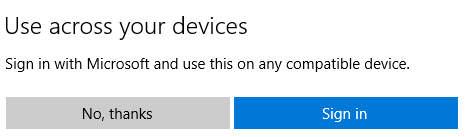
但今日發覺app store有D怪怪地. 有D free app 居然要login 先可以download

先前D free app click "get" 佢會問login or not 但今日好似 facebook or Netflix 等free app 直彈個Microsoft acct login prompt 出黎 一定要login, 無左個"No, Thanks". 唔知其他C HING 係咪都係咁.
作者: justiceice 時間: 2018-10-3 18:35
Disk Cleanup 已經可以 delete Windows.old, 下下都重裝簡直係自尋煩惱
不過 Disk Cleanup 今次有個伏就係多咗項 Downloads folder, 冇閱讀理解唔小心 tick 埋就會刪埋你個 Downloads folder 嘅嘢
作者: 556556bt 時間: 2018-10-3 18:41
本帖最後由 556556bt 於 2018-10-3 18:50 編輯
Disk Cleanup 已經可以 delete Windows.old, 下下都重裝簡直係自尋煩惱
不過 Disk Cleanup 今次有個伏就係 ...
justiceice 發表於 2018-10-3 18:35
oooh really ??? 咁又真係伏喎.
應該好似recycle bin 同download program 2 項咁 有個view files 制. 咁就會望一望安全D
不過, 呢個build 開始係想D 人用manage storage app. 入邊個download 好似係自己揀
作者: big_nature 時間: 2018-10-3 19:24
回覆 41# 556556bt
忘記左!
用尼度去清都得!
圖片附件: 123.jpg (2018-10-3 19:23, 120.12 KB) / 下載次數 44https://h2.hkepc.com/forum/attachment.php?aid=2085067&k=722191d8e7ed9a0f4493b37ce1d3b848&t=1781621717&sid=1NGI5DI10g

作者: Vista 時間: 2018-10-3 20:35
終於fix左FileZilla冇得drap and drop個問題...
7h1r733n 發表於 2018/10/3 17:48
竟然係 Windows 問題

一路都以為係 FileZilla 問題,
因為記得前幾個版本好似冇呢個問題。
作者: addison8406 時間: 2018-10-3 20:37
本帖最後由 addison8406 於 2018-10-3 21:04 編輯
更新後個磁碟清理好似怪怪地咁
作者: JonesChan 時間: 2018-10-3 20:52
請問大家有冇方法可以跳過C:唔夠位嘅情況下而更新到1809呢?
作者: JonesChan 時間: 2018-10-3 21:00
仲有一個問題,部Surface Pro 3更新完之後㩒左上角個Sleep制會黑畫面,但係Mon個背光燈仲係著住㗎喎。。。大家會有呢個問題嗎?
作者: imax 時間: 2018-10-3 21:06
請問大家有冇方法可以跳過C:唔夠位嘅情況下而更新到1809呢?
JonesChan 發表於 2018-10-3 20:52
我以前試過,插個外置硬碟,
份二十幾 GB windows.old
會引導你移去外置硬碟
作者: imax 時間: 2018-10-3 21:07
請問大家有冇方法可以跳過C:唔夠位嘅情況下而更新到1809呢?
JonesChan 發表於 2018-10-3 20:52
我以前試過,插個外置硬碟,
份二十幾 GB windows.old
會引導你移去外置硬碟
咁就夠位
作者: 556556bt 時間: 2018-10-3 21:11
回覆 556556bt
忘記左!
用尼度去清都得!
big_nature 發表於 2018-10-3 19:24
其實周圍都有......
作者: 556556bt 時間: 2018-10-3 21:11
請問大家有冇方法可以跳過C:唔夠位嘅情況下而更新到1809呢?
JonesChan 發表於 2018-10-3 20:52
download ISO
作者: 556556bt 時間: 2018-10-3 21:12
我以前試過,插個外置硬碟,
份二十幾 GB windows.old
會引導你移去外置硬碟 ...
imax 發表於 2018-10-3 21:06
呢個反而未試過喎
作者: 556556bt 時間: 2018-10-3 21:13
仲有一個問題,部Surface Pro 3更新完之後㩒左上角個Sleep制會黑畫面,但係Mon個背光燈仲係著住㗎喎。。。 ...
JonesChan 發表於 2018-10-3 21:00
有無check 下有無firmware upgrade?
作者: JonesChan 時間: 2018-10-3 21:38
我以前試過,插個外置硬碟,
份二十幾 GB windows.old
會引導你移去外置硬碟
咁就夠位 ...
imax 發表於 2018-10-3 21:07
今次1809好似唔比喎,佢一定要C:都要有番幾gb先可以將windows.old放喺其他hdd
作者: JonesChan 時間: 2018-10-3 21:39
download ISO
556556bt 發表於 2018-10-3 21:11
則係做隻usb嚟更新?
作者: JonesChan 時間: 2018-10-3 21:42
有無check 下有無firmware upgrade?
556556bt 發表於 2018-10-3 21:13
已Check,冇嘢再更新啦。。。
作者: imax 時間: 2018-10-3 21:46
今次1809好似唔比喎,佢一定要C:都要有番幾gb先可以將windows.old放喺其他hdd ...
JonesChan 發表於 2018-10-3 21:38
https://www.google.com.hk/amp/s/ ... software/win10/amp/
以往一直都得嘅,插手指都得
作者: JonesChan 時間: 2018-10-3 22:02
本帖最後由 JonesChan 於 2018-10-3 22:05 編輯
以往一直都得嘅,插手指都得
imax 發表於 2018-10-3 21:46
佢唔比我過喎。。。
 圖片附件: 1538574876911.jpg (2018-10-3 22:02, 116.6 KB) / 下載次數 47
https://h2.hkepc.com/forum/attachment.php?aid=2085101&k=478c1e35e02ef120e108fd9c9c6e8f81&t=1781621717&sid=1NGI5DI10g

作者: wkcc105 時間: 2018-10-3 22:06
今次1809好似唔比喎,佢一定要C:都要有番幾gb先可以將windows.old放喺其他hdd ...
JonesChan 發表於 2018-10-3 21:38
萬一陣係唔得,不妨試試將外置harddisk mount去c:一個windows.old。咦個方法有少少異想天開,但係冇其他辦法時,搏一搏。
作者: JonesChan 時間: 2018-10-3 22:06
以往一直都得嘅,插手指都得
imax 發表於 2018-10-3 21:46
宜家整緊隻手指,轉頭試埋手指方法。。。
作者: 556556bt 時間: 2018-10-3 22:24
已Check,冇嘢再更新啦。。。
JonesChan 發表於 2018-10-3 21:42
咁可能再等下或report bug
作者: 556556bt 時間: 2018-10-3 22:25
則係做隻usb嚟更新?
JonesChan 發表於 2018-10-3 21:39
係做個ISO 可以慳番D 位
作者: JonesChan 時間: 2018-10-3 22:38
係做個ISO 可以慳番D 位
556556bt 發表於 2018-10-3 22:25
最後用手指都係唔比過...
圖片附件: 123.png (2018-10-3 22:38, 73.79 KB) / 下載次數 33https://h2.hkepc.com/forum/attachment.php?aid=2085117&k=3c9ed44ffb72e1d4fceeea699d443c31&t=1781621717&sid=1NGI5DI10g

作者: JonesChan 時間: 2018-10-3 22:39
萬一陣係唔得,不妨試試將外置harddisk mount去c:一個windows.old。咦個方法有少少異想天開,但係 ...
wkcc105 發表於 2018-10-3 22:06
應該詳細係點做呢???
作者: 556556bt 時間: 2018-10-3 22:46
最後用手指都係唔比過...
JonesChan 發表於 2018-10-3 22:38
C HING 不如清左個HDD 先install
行disk cleanup --> run as admin
作者: imax 時間: 2018-10-3 22:48
最後用手指都係唔比過...
JonesChan 發表於 2018-10-3 22:38
似 A 部份唔夠位,要移走個人 data,清咗 D 軟件
作者: JonesChan 時間: 2018-10-3 22:52
本帖最後由 JonesChan 於 2018-10-3 23:09 編輯
似 A 部份唔夠位,要移走個人 data,清咗 D 軟件
imax 發表於 2018-10-3 22:48
C HING 不如清左個HDD 先install
行disk cleanup --> run as admin
556556bt 發表於 2018-10-3 22:46
已經清到冇嘢好清啦...

呢6XX MB清完又會翻生架...
同埋呢部係SERVER,所以好多SOFTWARE都唔DEL得...
圖片附件: 12.png (2018-10-3 22:52, 54.97 KB) / 下載次數 39https://h2.hkepc.com/forum/attachment.php?aid=2085127&k=22ab02e75e83952ea54f22b56138d394&t=1781621717&sid=1NGI5DI10g

作者: 556556bt 時間: 2018-10-3 22:55
已經清到冇嘢好清啦...
呢6XX MB清完又會翻架...
同埋呢新係SERVER,所以好多 ...
JonesChan 發表於 2018-10-3 22:52
run in admin mode already?
作者: JonesChan 時間: 2018-10-3 23:02
run in admin mode already?
556556bt 發表於 2018-10-3 22:55
admin mode則係清理系統檔?
作者: JonesChan 時間: 2018-10-3 23:07
部server由windows7>8>8.1>10都冇洗過機。
但係上咗win10後食hdd真係食得好L勁。
頭先睇windows個folder有成26gb,但係另一部機只係得22gb

作者: wkcc105 時間: 2018-10-4 00:16
應該詳細係點做呢???
JonesChan 發表於 2018-10-3 22:39
圖片附件: 2018-10-04.png (2018-10-4 00:16, 5.62 KB) / 下載次數 29https://h2.hkepc.com/forum/attachment.php?aid=2085140&k=3072b3275b49e71fddac2bbe5f35a266&t=1781621717&sid=1NGI5DI10g
 圖片附件: 2018-10-04 (1).png (2018-10-4 00:16, 6.12 KB) / 下載次數 72
https://h2.hkepc.com/forum/attachment.php?aid=2085141&k=6002fabfa27738bd5b995dc88187ffbb&t=1781621717&sid=1NGI5DI10g

作者: 556556bt 時間: 2018-10-4 01:05
admin mode則係清理系統檔?
JonesChan 發表於 2018-10-3 23:02
唔係. admin mode 行disk clean 會清埋D update files 同其他無用既temp. files 可以清多好多野出黎
作者: coffeelam 時間: 2018-10-4 08:36
打鬼火我直情重新裝過windows
作者: imax 時間: 2018-10-4 10:01
份 wins.old 比以前細份,6.51 GB
作者: justiceice 時間: 2018-10-4 10:27
請問大家有冇方法可以跳過C:唔夠位嘅情況下而更新到1809呢?
JonesChan 發表於 2018-10-3 20:52
你差幾多位?
可以試吓暫停 hibernate (休眠) 功能, 暫時停用 pagefile, 清理 C:\Windows\SoftwareDistribution\
用緊 SSD 又速度許可嘅話, 開著 CompactOS
https://www.howtogeek.com/271225 ... dows-10s-compactos/
作者: imax 時間: 2018-10-4 10:31
終於加入返修改介面字型大小嘅設定:
以後唔使再靠改registry 去改。
===========
另外個emoji ...
Fanolian 發表於 2018-10-3 17:25
正呀,可 set 到好大粒字啊

作者: imax 時間: 2018-10-4 11:43
剪取與繪圖 新 app
剪完後儲存唔得

作者: 556556bt 時間: 2018-10-4 12:39
剪取與繪圖 新 app
剪完後儲存唔得
imax 發表於 2018-10-4 11:43
save 唔到?
但呢個snip 無左delay trigger 唔可以完全replace 舊的
作者: 556556bt 時間: 2018-10-4 12:39
剪取與繪圖 新 app
剪完後儲存唔得
imax 發表於 2018-10-4 11:43
得喎....
作者: JonesChan 時間: 2018-10-4 13:31
本帖最後由 JonesChan 於 2018-10-4 13:37 編輯
最後終於都夠位更新,但係上完1809之後,個虛擬ubuntu開唔到(下圖)
之後回復番1803就冇事。
真係火都嚟。
圖片附件: 1538631404362.jpg (2018-10-4 13:37, 122.58 KB) / 下載次數 51https://h2.hkepc.com/forum/attachment.php?aid=2085209&k=548eb2dff12ba9e9459bb72e4b6f59b0&t=1781621717&sid=1NGI5DI10g

作者: imax 時間: 2018-10-4 14:13
得喎....
556556bt 發表於 2018-10-4 12:39
我兩部 notebook 升上 1809 , 呢個新 app 一樣都 save 唔到
圖片附件: 擷取.JPG (2018-10-4 14:12, 32.25 KB) / 下載次數 68https://h2.hkepc.com/forum/attachment.php?aid=2085212&k=47007ca77dfb1c166c64382587cef10b&t=1781621717&sid=1NGI5DI10g

作者: 556556bt 時間: 2018-10-4 14:21
我兩部 notebook 升上 1809 , 呢個新 app 一樣都 save 唔到
imax 發表於 2018-10-4 14:13
咁奇怪?! ... CHING 試下remove 個app 再安過睇下情況有無改善
作者: Fanolian 時間: 2018-10-4 14:56
本帖最後由 Fanolian 於 2018-10-4 15:00 編輯
save 唔到?
但呢個snip 無左delay trigger 唔可以完全replace 舊的
556556bt 發表於 2018-10-4 12:39
同埋無得只cap 某一window,要自己畫。
不過delay capture 暫時可以用Win+Ctrl+S,或者「print screen 掣會開snip app」呢個功能代替。
Settings > Ease of Access > Keyboard > Print Screen shortcut
作者: coffeelam 時間: 2018-10-4 15:03
同埋無得只cap 某一window,要自己畫。
不過delay capture 暫時可以用Win+Ctrl+S,或者「print screen 掣 ...
Fanolian 發表於 2018-10-4 14:56
Also can only save @png
作者: wkcc105 時間: 2018-10-4 15:29
wkcc105 發表於 2018-10-4 00:16
親自試過咦個方法唔得,但係好彩,60GB SSD update 1809順利過關。升級前大概剩25GB,更新後還有11GB。
作者: pineapple2006 時間: 2018-10-4 15:54
部pc已經更新咗,但部surface pro 4不停check update都冇得update
唔知搞乜
作者: wkcc105 時間: 2018-10-4 16:47
有個小問題。
配置如下
2600x + x470 + sm961 (data disk)
只要裝samsung nvme driver (2.3或3.0),只要用sleep功能,wake up時候會變死機再自動reboot。
如果不用sleep功能,都沒問題。
作者: Vista 時間: 2018-10-4 18:09
update完之後個藍芽耳機成日聽聽下歌冇聲(冇斷線),成日要重連至有返聲,好麻煩...
同埋個 dark mode 始終冇 linux gnome/kde dark theme 咁順眼
via HKEPC IR Pro 3.4.0 - iOS(2.3.3)
作者: JonesChan 時間: 2018-10-4 18:12 標題: RE: Win10更新 1809
親自試過咦個方法唔得,但係好彩,60GB SSD update 1809順利過關。升級前大概剩25GB,更新後還有11G ...
wkcc105 發表於 2018-10-4 15:29
我就係60gb ssd
作者: mingming19 時間: 2018-10-4 19:13
提示: 作者被禁止或刪除 內容自動屏蔽
作者: imax 時間: 2018-10-4 20:03
咁奇怪?! ... CHING 試下remove 個app 再安過睇下情況有無改善
556556bt 發表於 2018-10-4 14:21
巳用 C cleaner 剷咗重新 dl 個都一樣, save 不到
依家永久移除了, 用返剪取工具仲習慣
作者: ac97 時間: 2018-10-4 20:14
嚴管第三方殺軟 ??? 咩來?
作者: pineapple2006 時間: 2018-10-4 20:49
剪取與繪圖 新 app
剪完後儲存唔得
imax 發表於 2018-10-4 11:43
之前都有個snipping tool,唔知有咩分別
作者: KEPCH 時間: 2018-10-4 20:52
1809 有沒有新增功能:藍牙裝置電量顯示?
作者: Zoo 時間: 2018-10-4 21:41 標題: [轉貼]Windows 10 1809版出事了 呼籲大家慎重升級
本帖最後由 Zoo 於 2018-10-4 22:24 編輯
https://m.gameapps.hk/news/30247
另外再上reddit睇好似有d人中招,我自己都係睇定d先,就算要升都係做足backup先好
作者: imax 時間: 2018-10-4 22:15
Windows 10 1809版出事了 呼籲大家慎重升級 - GameApps.hk
Zoo 發表於 2018-10-4 21:41
data 一向唔擺 C drive
作者: 聖人 時間: 2018-10-4 22:16
提示: 作者被禁止或刪除 內容自動屏蔽
作者: sunyan12 時間: 2018-10-4 22:18
回覆 94# Zoo
DATA 一向備份上GOOGLE DRIVE , 及USB 手指/ 其他HARDDISK
作者: imax 時間: 2018-10-4 22:26
個 mixed reality portal 冇用,以前剷佢唔到
到 1809 用 C cleaner 卒之見到佢剷咗喇
作者: VADER 時間: 2018-10-4 22:30
另外有一部機........自動更新...等極都冇更新推送.......


作者: Once 時間: 2018-10-4 22:45
本帖最後由 Once 於 2018-10-4 22:47 編輯
尋日升左三部laptop
Sony, Asus 無事
但部Dell 升完之後發現比佢del 左好多Dell 跟機software, 包括用嚟check driver update 果個
即刻將desktop 個windows update services stop左
再將個update server 指去localhost 唔比佢check update 先